Top 5 Car Travel Map Animation Apps in 2026
 Jaseel S6 min read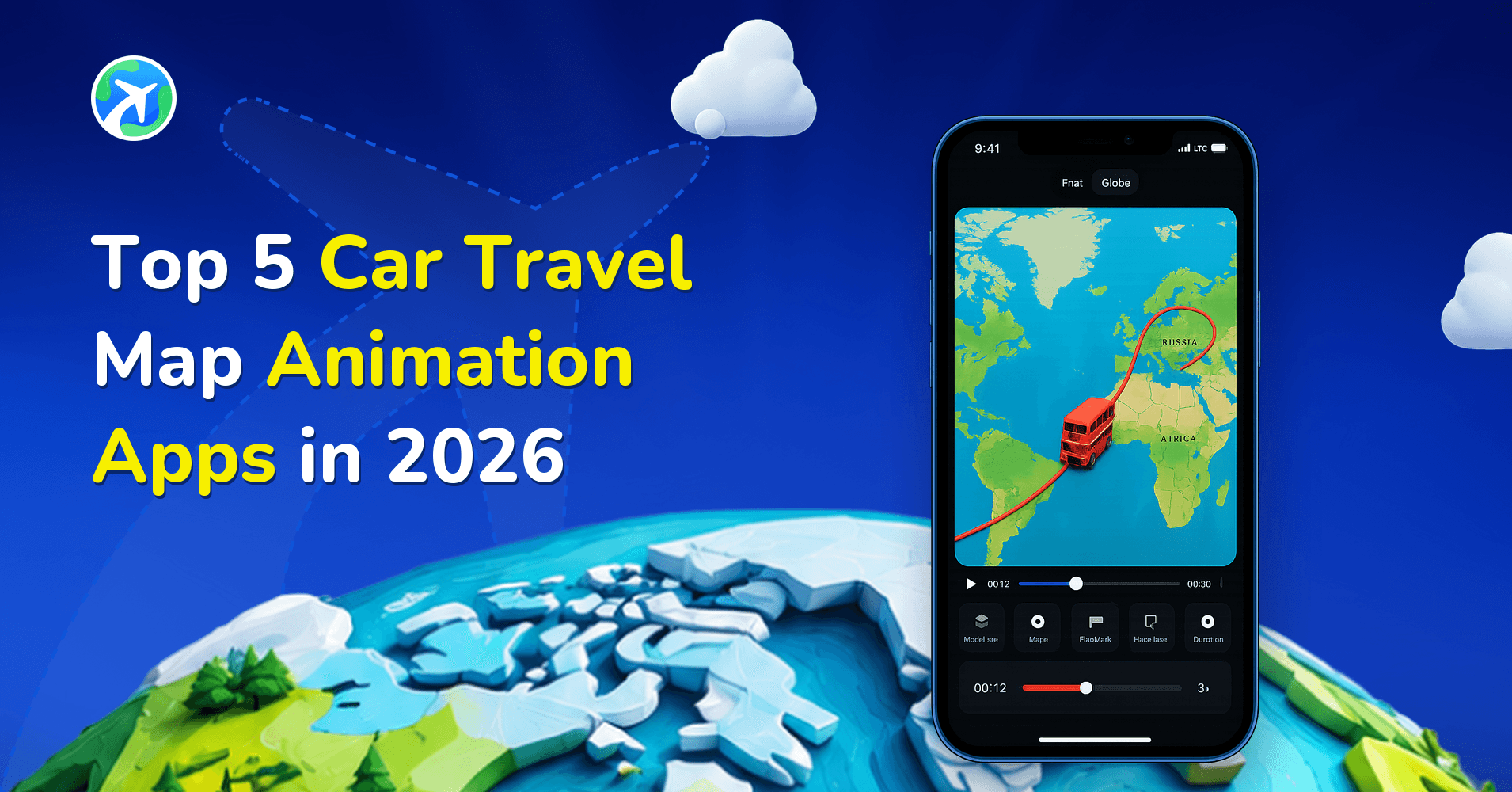
In this article 5 sections
Car travel map animation apps turn a road-trip itinerary into a video showing movement between stops. Travel Animator and TravelBoast offer mobile editing, while PictraMap, Anim8map and Mult.dev provide browser-based approaches. Choose by your editing workflow and the finished output you need.
Publisher disclosure: This guide is published by the team behind Travel Animator. It compares our product with alternatives and is not an independent review. Features were checked against the linked product documentation on September 17, 2026. Availability and purchase options can vary by app version, device and region.
Five tools to consider for a road-trip video
This is a shortlist, not a universal ranking. A creator editing on a phone has different needs from someone preparing a trip presentation at a desk. Before comparing subscriptions, decide whether you need an exported video, a map that visitors can explore online, or a short clip to insert into a larger film.
1. TravelBoast
TravelBoast offers mobile route animation with vehicle choices, route-line controls and photo or video annotations. Its documentation includes GPX and Google Maps support, and its subscription includes 4K output. See its editing tutorials and subscription FAQ. Try it if you want to build and decorate an itinerary on your phone.
2. Travel Animator
Travel Animator is our iOS and Android app for creating route videos with 3D vehicles, place labels, media and map styles. You can add stops manually or import a Google Maps link or GPX file. Pro includes the wider model and map collections and 4K export; the free version is a way to try the workflow first. Check the Free and Pro feature comparison before choosing a plan.
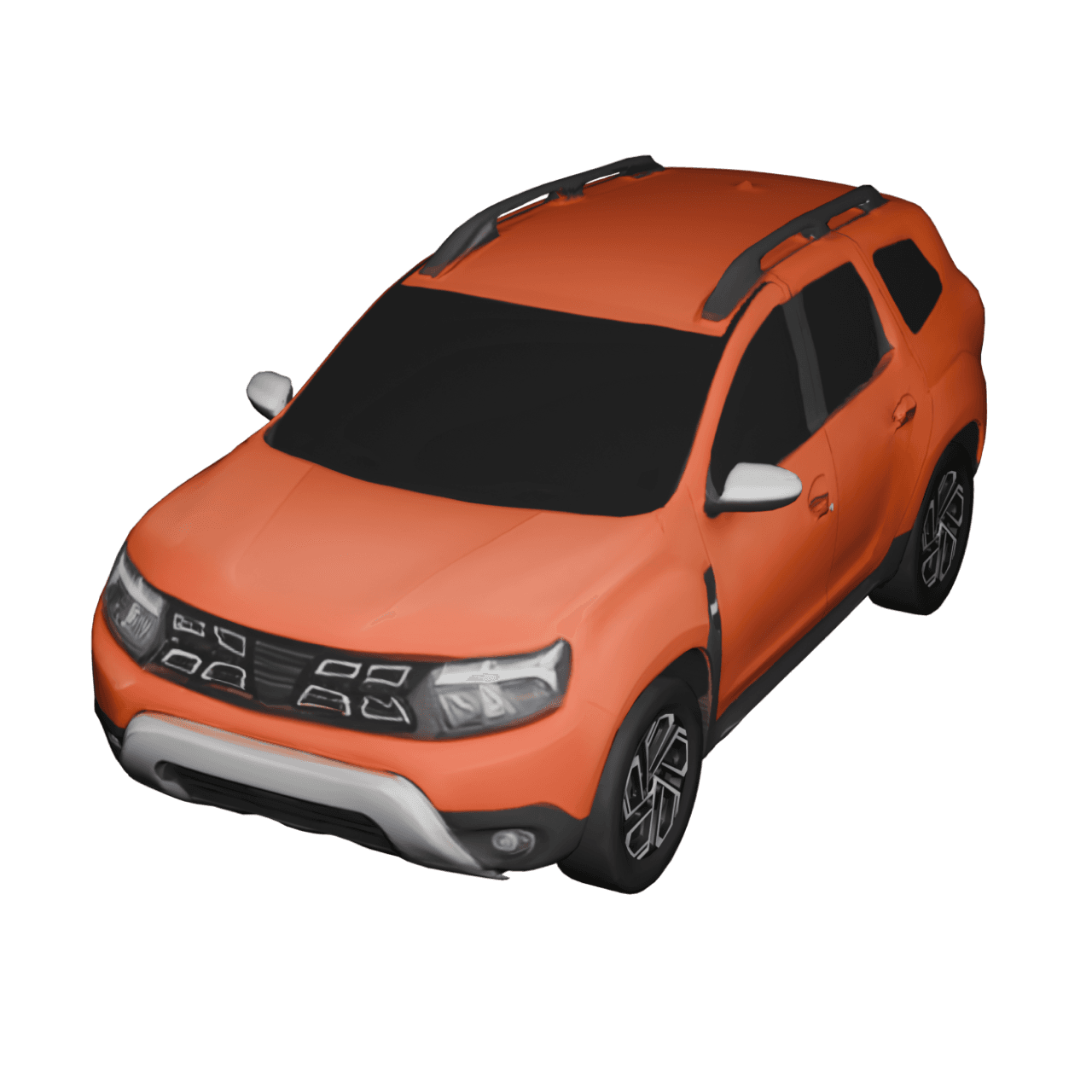
For a car journey, start with a few stops and test the Real Route setting where appropriate. Review the displayed path before exporting: an animation is a presentation of your itinerary, not turn-by-turn navigation. The car model gallery helps you choose a vehicle that suits the trip.
3. PictraMap
PictraMap is a web-based animated travel-map tool built around destinations and photos. It offers map and presentation customization and online sharing or embedding. Its site also documents video conversion. See the PictraMap product overview and current plans. Check the output included in the plan you select rather than assuming online sharing and video download are interchangeable.
4. Anim8map
Anim8map creates 3D travel videos in a browser workflow: choose a style, enter stops and transport modes, optionally add photos, then receive a rendered video. Its official examples and FAQ explain the process. It is worth trying if you prefer entering an itinerary and letting the service produce the animation. Confirm export and branding options before paying.
5. Mult.dev
Mult.dev is a travel-map animation service for turning trips into videos to share or present. It is not simply a developer embedding tool. Start with the official editor and check its pricing for the available export options. A browser workflow may suit you when your itinerary and other presentation assets are already on a computer.
How to compare the results
Use one small test itinerary across the tools you are considering. Include a start, an intermediate stop and a destination, then add one photograph. This keeps the comparison manageable and exposes the controls you will actually use. A demonstration video on a product website may use a paid plan or a carefully prepared route, so your own test is more useful than comparing promotional clips.
- Route: Check stop order and whether the drawn path tells the intended story.
- Readability: Watch the preview at phone size. Labels should remain clear without hiding the vehicle.
- Output: Check aspect ratio, watermark, resolution and how you obtain the finished file.
- Editing: Try correcting a stop or replacing a photo before committing to a long project.
- Cost: Read the checkout terms for your region and confirm whether you are buying a subscription or another type of access.
Choose the tool that makes your intended video easiest to finish. You do not need every available effect for a clear road-trip recap. The following walkthrough uses Travel Animator so you can see a concrete example; the exact controls in the other products will differ.
How to Create a Car Travel Map Animation (Step-by-Step)
All the apps mentioned above offer useful tools for creating animated car travel route maps. However, you might still wonder how the actual process works inside one of these apps. To give you a clearer understanding, let’s walk through a practical example of how to create a car travel route animation using the TravelAnimator app on an iOS device. By following this practical example, you’ll understand how simple it is to turn a regular trip into an engaging animated map route video.
1.Download the TravelAnimator app and open it.
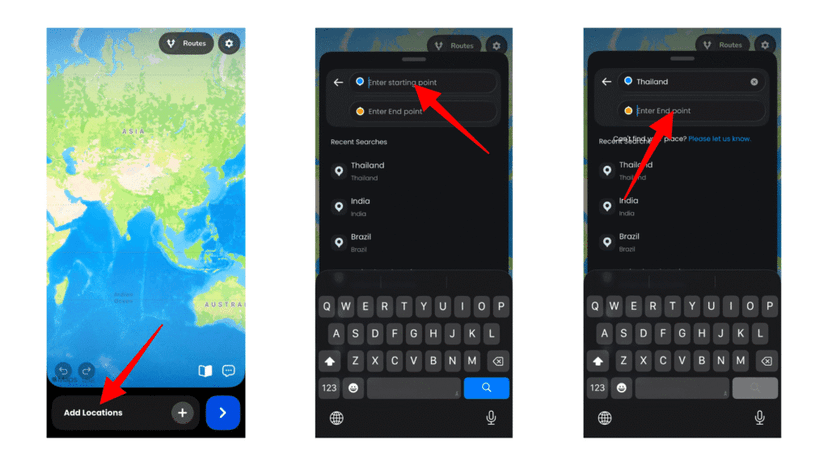
2. Tap Add Locations to enter your starting and ending points by typing the names of the locations.
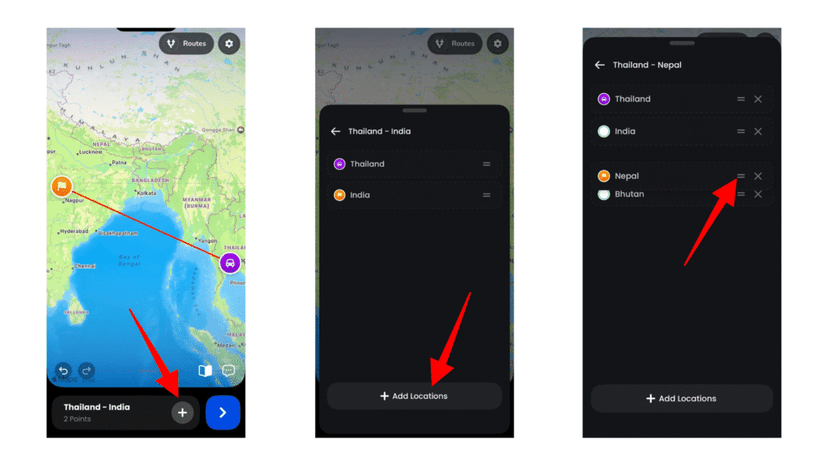
3. Tap + button to add more destinations. Drag the destinations to make the correct order.
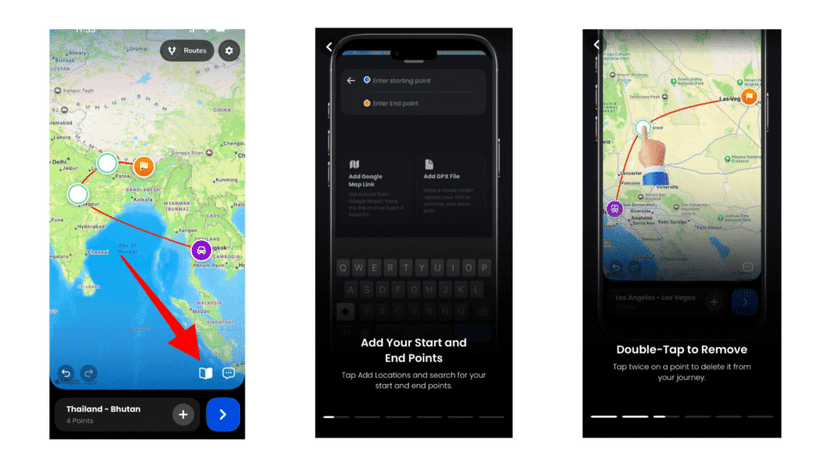
4. If you are using the app for the first time, it will show you a tutorial on the key features for creating your travel animation.
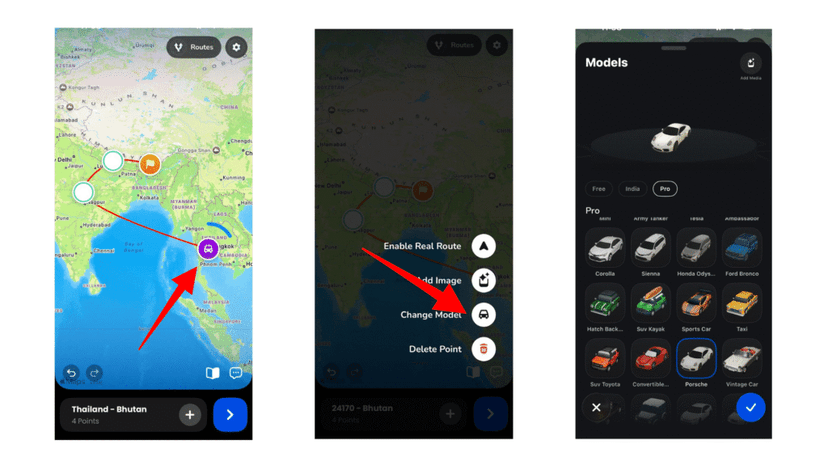
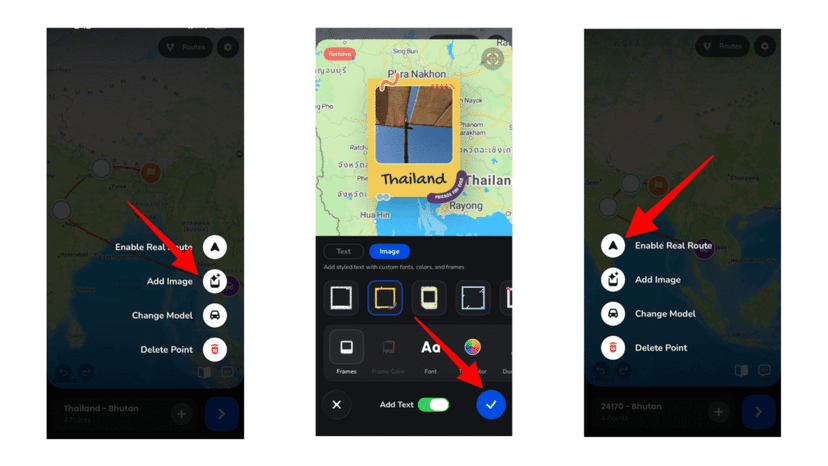
5. Long-press on a route point to change the model to a car. Select the car suitable for your journey.
5. Personalize the animation by adding and customizing images and text to match the theme. You can also enable Real Routes at any stop if needed.
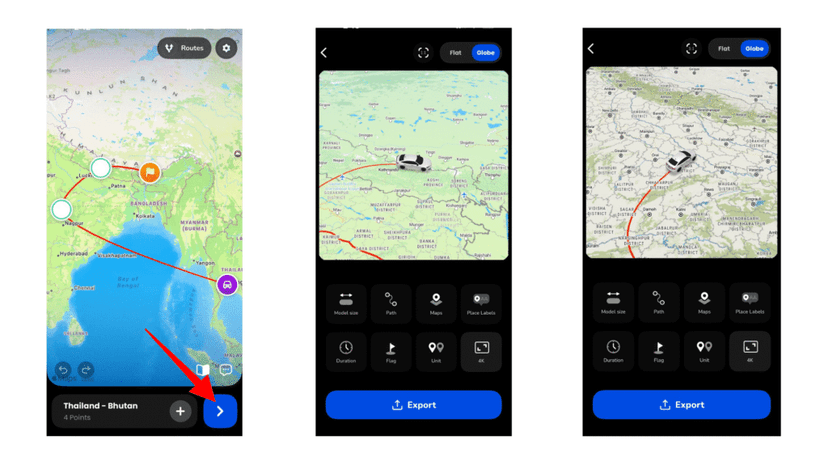
7. Preview the animation and adjust video duration, model size, aspect ratio, etc. Customize the Route by adjusting the route line, map style (2D or 3D), and modifying place labels.
FAQs About Car Travel Map Animation Apps
Are there free car travel map animation apps available?
Yes, several car travel map animation apps offer free versions. Most free plans allow you to create basic animations, but they may include watermarks, limited export quality, or restricted map styles. Premium versions usually unlock advanced customization, HD/4K export, and additional vehicle models.
Can I create a car route animation directly in Google Maps?
Google Maps does not provide a built-in feature to export animated route videos. To create a car route animation from Google Maps, you would typically need third-party apps like TravelAnimator that allow you to import Google Maps links and convert them into animated map videos.
Do I need video editing skills to create a car travel route animation?
No, most modern car travel map animation apps are designed for beginners. You simply enter your starting point and destination, customize the route, choose a vehicle model, and export the animation. The process usually takes just a few minutes.
Can I animate a custom car route with multiple stops?
Yes, most car travel map animation apps allow you to add multiple stops between your starting and ending points. This makes it easy to create detailed car road trip map animations that show every destination along the way.
Finding the Best Car Travel Map Animation Apps
Car travel map animation apps continue to evolve in 2026, offering more flexibility and creative control than ever before. Whether you’re using iOS or Android or looking for a free download, there are several reliable tools to help you animate your journeys. Each app has its own strengths. Some focus on simplicity, others offer advanced customization, web-based flexibility, or desktop-level control. The best choice depends on your technical comfort level, your storytelling goals, and the type of content you want to create.
Animated car route maps make travel plans easier to visualize, road trips more engaging to share, and itineraries more professional to present. Explore the options, test what works for you, and choose the tool that best fits your travel style and creative needs.