Travel Wrapped: How to Turn Your Year Into a Travel Recap Video (2026)
 Jaseel S12 min read
In this article 9 sections
Spotify Wrapped shows your year in music. A Travel Wrapped shows your year through the places you’ve visited, from a road trip you almost cancelled to a train journey with beautiful views or a flight to a new country.
You can turn your trips from 2026 into one animated map video using Travel Animator on your phone. Show each journey in order with the car, train, boat, or plane you actually used, and bring your year of travel together in one video.
In this guide, you’ll learn how to collect your travel details, choose a recap format, create your animated map, and share the finished video on social media. Whether you’re a travel blogger, a couple, a family, or someone who took just a few trips this year, you can make a recap worth sharing.
What is a Travel Wrapped Video?
A travel wrapped video is a short clip that replays every trip of your year on an animated map. Each journey plays in order, with the vehicle you used, and the video ends on one map showing everywhere you went.
It works better than a photo dump because a map shows movement. Photos tell people where you were. A route line shows how far you went, how the trips connect, and how much ground one year covered.
Travellers, couples, families, travel bloggers, and road trippers can all create a Travel Wrapped video. Even if you took only one or two trips, you can still turn them into a memorable recap.
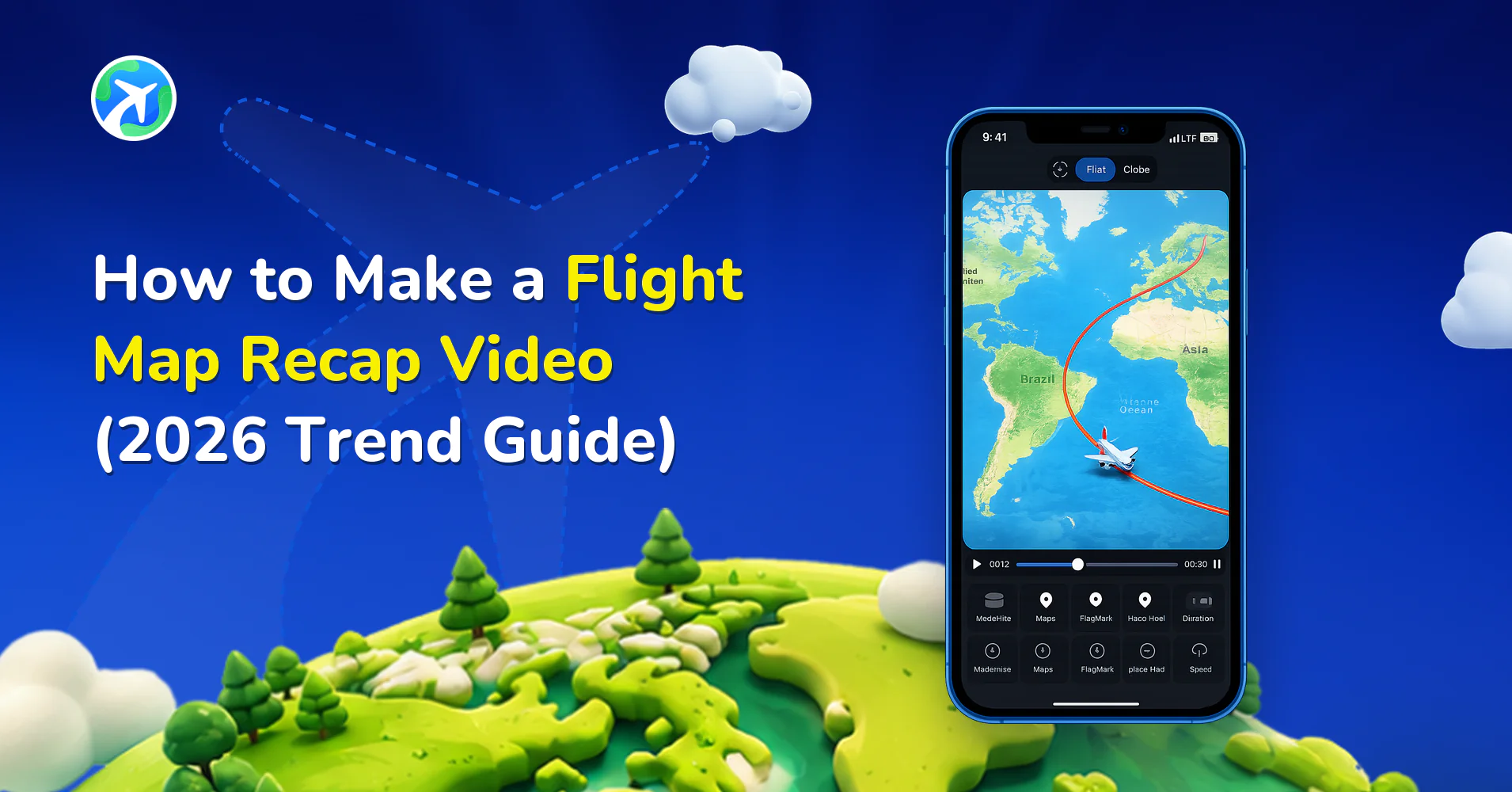
If you mainly want to show your flights on a globe, with a plane moving between cities, read our guide to the flight map recap trend.
What to Gather Before You Build Your Year
Spend about ten minutes collecting your travel details before opening the app. Having everything ready will save you time when you start creating the animation.
- List all your trips, dates, and vehicles – Write down every trip you took during the year. Include the dates and how you travelled, whether by car, train, plane, boat, or bike.
- Find your travel records – Scroll your camera roll by location, search your inbox for bookings and tickets, and check your calendar. Google Maps Timeline can help if it’s turned on for your phone.
- Calculate your travel stats – Count your trips, countries, and cities. You can also estimate the total distance you travelled or identify your longest journey. These details can make the ending of your video more interesting.
- Choose one photo for each trip – Pick a photo that best represents each journey. It could be a mountain view, a city street, a beach, or a memorable moment from the trip.
Plan Your Trips Before You Start
| Month | Trip | From → To | Vehicle | Photo picked? | Travel Highlight |
|---|---|---|---|---|---|
| Feb | Weekend getaway | Kochi → Munnar | Car | Yes | First hill-station drive |
| May | Summer holiday | Mumbai → Goa | Train | Yes | 10 hours by rail |
| Oct | First trip abroad | Kochi → Dubai | Plane | Yes | New country |
Choose a format for your travel recap video
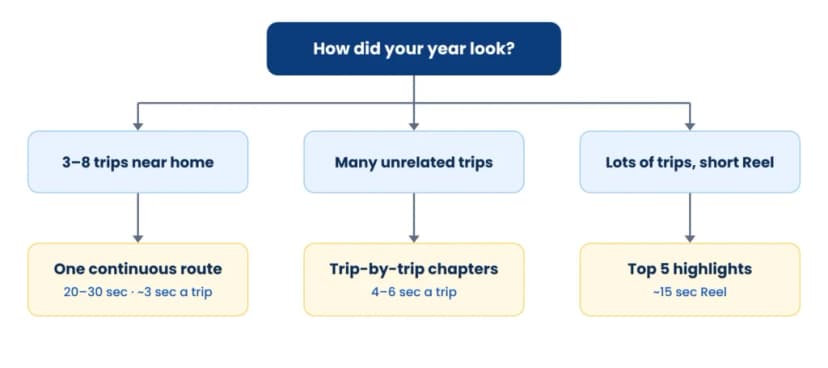
Before opening Travel Animator, decide how you want your video to tell the story of your year. The format affects how many routes you create and how long the final video will be.
One Continuous Route
Show your whole year as one journey, from your first trip to your last. This works best when you have around three to eight trips that start and end near your home or connect naturally on the map.
Aim for a video of 20 to 30 seconds, with around three seconds for each trip. If the routes cross or overlap, check the preview to make sure viewers can still follow them.
Trip-by-Trip Chapters
Give each trip its own short section, with a month label to show when it happened. Each section can last around four to six seconds.
This format works well if you visited places that don’t connect in a clear route. It also gives each holiday or journey its own moment instead of showing everything on one crowded map.
Top Five Highlights
Choose your five favourite trips and leave out the rest. This is a good option if you travelled a lot during the year or want to make a quick 15-second Reel.
Focus on the trips that meant the most to you, rather than trying to include every destination.
How to Make Your Travel Recap Video in Travel Animator

Download Travel Animator for iOS or Android to get started. If you’re new to the app, read our guide on how to use Travel Animator first.
1. Add Your Trips Manually or Use a Google Maps Link
Start by adding the stops from your travel planner.
If you want one continuous route, add your trips in date order to a single route. If you prefer separate chapters or a highlights video, create each trip as its own project.
If you planned a journey using Google Maps, you may be able to paste its route link into Travel Animator instead of adding every stop manually. This can save time when building your recap.
2. Match Each Route to the Vehicle You Used
One of the best parts of a Travel Wrapped video is showing how you actually travelled. Use a car for road trips, a train for rail journeys, a boat for ferry trips, and a plane for flights.
Using different vehicles makes your video feel more personal. Instead of showing a plane moving around the map for every trip, you can show the different ways you explored the world throughout the year.
If you took several train journeys, read our guide on how to animate a train journey for more ideas.
3. Add Photos and a Travel Stats Ending
Choose one photo for each trip and add it to the main stop for that journey. This gives viewers a closer look at the places you’ve visited and helps turn the map into a story about your year.
Next, plan how you want to end the video. You could show a few simple stats, such as:
- 9 trips taken
- 4 countries visited
- 6,200 km travelled
You can add these details as a text overlay in Instagram, TikTok, or CapCut over the final map frame. Keep the numbers easy to read and choose stats that help tell your travel story.
4. Export Your Video for the Platform You Use
Choose the video format based on where you plan to share your recap.
- 9:16 vertical format — Best for Instagram Reels, TikTok, YouTube Shorts, and WhatsApp Status.
- 16:9 horizontal format — Better for YouTube videos or playing your recap on a television during a family gathering.
Preview your video before exporting to check that the routes, vehicles, photos, and timing look right.
If you’ve created separate clips for each trip, you can join them in an editor such as CapCut or InShot. This also gives you a chance to add transitions, month labels, and music.
The free plan includes a watermark. If you want a clean export without it, see our Travel Animator Free vs Pro guide.
How to Make People Watch Your Recap to the End
Your travel recap tells the story of a whole year. A few simple changes can make it more interesting and encourage viewers to watch until the final frame.
- Start with your biggest moment, not January – Open with your most exciting trip or your biggest travel statistic. Then take viewers back to the beginning of the year. For example, you could start with “My year ended with a trip across three countries” before showing how it all began.
- Show how the year moves forward – Add a month label to each trip so viewers can follow your year. You can also change map styles to reflect different seasons or the mood of each journey.
- Highlight your first experiences – Show special moments such as your first solo trip, your first visit to a new country, or your first overnight train journey. A short caption can help viewers understand why that trip mattered to you.
- End with the full map and your key travel moments –Show all your routes together with your travel numbers. Keep the final frame on screen for around two seconds, so viewers have time to take it in. You can also use this frame as your cover image.
- Ask a question in your caption – Give viewers a reason to comment. For example, ask, “Which trip should I repeat in 2027?” This makes it easier for people to share their ideas or talk about their own travel plans.
Travel Recap Ideas for Bloggers, Couples, Families, and Creators
The basic steps are the same for everyone, but you can change the story to match your audience and the type of trips you took.
Travel Bloggers and Vloggers
Your Travel Wrapped video can work as a quick summary of your year as a creator. Include stats such as the number of countries visited, trips completed, or travel videos published.
You can also add your logo to create a branded version without a watermark using Pro. Share the recap on your Instagram profile and include it in your own year-in-review blog post.
Traveling Couples
Make your video about the year you spent travelling together. You could begin or end with the place where you met, your first trip as a couple, or another special destination.
Add a photo of the two of you at each stop to make the recap more personal. It can also be a thoughtful anniversary gift or a surprise to share around New Year’s.
Families
For families, the main audience may be your family group chat rather than your social media followers. Keep the video simple and use the trip-by-trip format so every holiday gets its own section.
You can also export a horizontal 16:9 version to play on the television when everyone gets together. It is a simple way to revisit the year’s family trips.
Social Media Creators
Make the first second count with a bold hook like “I visited 7 countries in 2026.” Keep it under 20 seconds, use the top-5 highlights format, and post a second version a week later showing how you made it. Behind-the-scenes posts often outperform the original.
Road trippers
If most of your year was spent driving, make the car the hero. Use one continuous route so the road line grows across the map, and add the total distance driven to your end card.
Travel businesses
Tour operators, travel agents and homestays can recap “every trip our guests took this year”. Add your brand logo on Pro and share it in December as a thank-you post to past customers.
Where to share your travel wrapped video
Post your recap between about 20 December and the first week of January, when year-end recaps fill every feed and people are in the mood to look back. Wait until your last trip of the year is done.
- Instagram Reels and TikTok: your widest reach. For specs and caption tips, see our Instagram Reels guide. Find trending sounds in TikTok’s Creative Center.
- WhatsApp status and family groups: often the people who care most about your trips.
- YouTube: upload the 16:9 version as a keepsake you can rewatch every December.
Hashtags to use: #travelwrapped #2026recap #travelrecap #yearinreview
FAQs about Travel Recap Videos
What's the difference between a travel wrapped video and a flight map recap?
A travel wrapped video covers your whole year of travel by road, rail, sea and air, with photos and stats. A flight map recap is a specific social media trend that shows only your flights, usually as a plane hopping across a globe. For the flights-only version, see our flight map recap guide.
Can I make a year in review travel video for free?
Yes. TravelAnimator’s free plan lets you build and export your recap with 10+ vehicle models; free exports carry a watermark. Pro unlocks 300+ models, 30+ map styles including seasonal ones, HD or 4K export and no watermark. Compare plans in our free vs Pro guide.
How long should a travel recap video be?
Aim for 15 to 30 seconds for Reels and TikTok, which is roughly 3 to 5 seconds per trip. A family or YouTube version can run longer, up to about a minute, because that audience already cares about your trips.
Can I use my Google Maps Timeline to build my recap?
Yes. Your Timeline is a useful record of the places you visited this year, as long as it was turned on. Google now stores Timeline on your phone rather than online, as explained in Google Maps Help.
How do I add music to my travel recap video?
TravelAnimator exports video without sound, so add music when you post. Our flight map recap guide explains how to add trending audio in Instagram, TikTok or CapCut.
What if I only took one or two trips this year?
That’s still a recap worth making. Add the stops within each trip, such as each beach, temple or city on a road trip, so the route has more to show. A single well-told trip often gets more replays than a crowded year.
Turn your year into one travel recap video
Your year of travel is already sitting in your camera roll and inbox. Pick a format, map every trip with the vehicle you actually took, and finish on the full map of where 2026 took you. A travel recap video takes one evening to make and gets watched every December after.
Download TravelAnimator free and start your 2026 travel wrapped.