[object Object]plane_with_strokeLaunching SOON on Product Huntget_app_banner_bg

How to Create a Stunning Travel Recap Map with TravelAnimator

|Jaseel

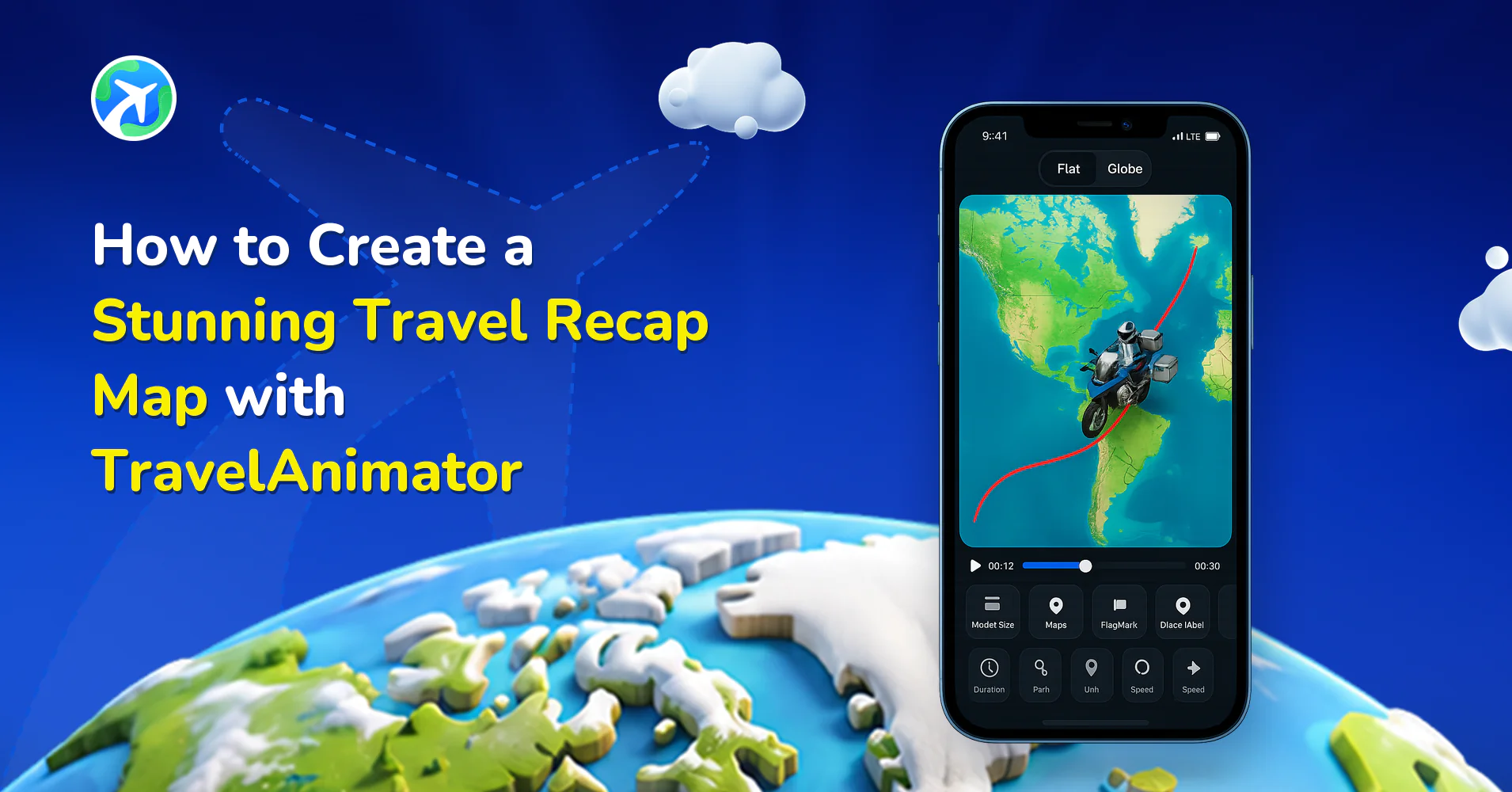
TravelAnimator creates a stunning travel recap map, a visual summary of your journey that shows routes, destinations, and movement in a way photos alone can’t.

Imagine finishing a road trip across multiple cities, a backpacking journey through Europe, or a family vacation with several stops. Weeks later, you remember the highlights, but the exact routes, distances, and order of places start to fade. A travel recap map solves this by visually recreating your journey on a map, turning memories into a story you can replay anytime.

In this guide, you’ll learn what a travel recap really is, why map-based recaps are becoming popular, and how you can use TravelAnimator to turn your trips into animated travel recap videos without editing skills, complex tools, or hours of work.

What Is a Travel Recap and Why Is It Important

A travel recap is a summary of your journey that captures where you went, how you traveled, and how the trip extended over time. Traditionally, this meant photo albums, videos, or social media posts. But these formats often miss the journey itself.

Travel is about the path between them more than just about destinations. A travel recap helps you relive the whole journey, remember routes, distances, and sequences, share your experience in a way others can easily understand, and preserve memories in a structured, visual format.

For creators, travel recaps also help build storytelling content. For families, they become digital memories. For travelers, they serve as a personal travel diary. As trips become more frequent and multi-stop, having a clear recap format becomes even more valuable.

What People Mean When They Search “Travel Recap App”

When users search for a travel recap app, they are usually not looking for professional video editing software. Instead, they want something simple, fast, and visuallybeautiful.

Most users are searching for an app that automatically or easily summarizes trips, provides a visual way to show routes and destinations, is mobile-friendly with minimal effort, or allows them to share their journey on social media.

They often feel overwhelmed by hundreds of photos and videos with no clear structure. A travel recap app is expected to organize the journey without complicating it. This is where map-based travel recap apps stand out, as they focus on movement, progression, and storytelling rather than raw media clutter.

Travel Recap Map: A Better Way to Relive Your Journey

A travel recap map visually shows your journey by connecting destinations with animated routes. Instead of scrolling through images, you watch your trip unfold geographically.

Travel recap maps are powerful because they show the whole route from start to finish, highlighting the scale and distance of your journey. It makes multi-stop trips easy to understand, to feel immersive, and story-driven.

Whether it’s a cross-country road trip, a flight across continents, or a city-hopping adventure, a map-based recap helps viewers and even yourself understand the journey at a glance. This format is especially effective for sharing on platforms like Instagram Reels, Stories, and YouTube Shorts, where short, engaging visuals perform best.

How TravelAnimator Works as a Travel Recap App

TravelAnimator is designed specifically to create animated travel recap maps. Instead of focusing on editing timelines or transitions, the app focuses on what matters most: your route and story.

With TravelAnimator, you can add destinations manually or import routes, animate paths between locations, choose travel models like cars, planes, buses, or ships, select 2D or 3D map styles, and customize colors, labels, images, and animations.

The app works on a simple principle: add your journey, customize the look, and export the recap video. This makes it ideal for travelers who want professional-looking recaps without professional tools.

Creating Your First Travel Recap Map in TravelAnimator

Creating a travel recap map in TravelAnimator takes only a few minutes and follows a clear flow.

  1. Start by opening the app and creating a new project. 
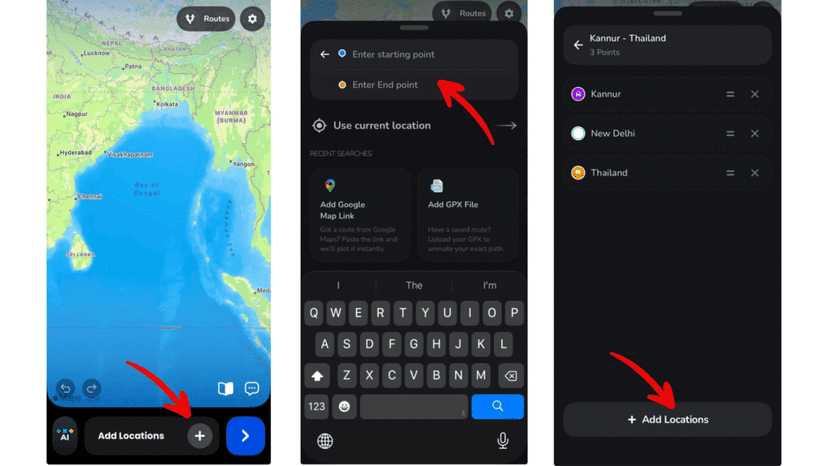
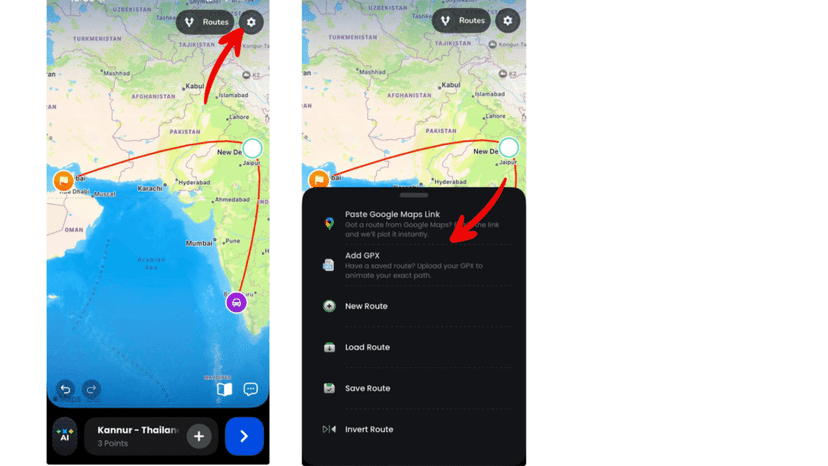
  2. Add your starting location and destination. If your journey includes multiple stops, you can add as many locations as needed and reorder them.
  3. You can easily move the route by dragging the points. 
  4. Once your route is in place, choose how you traveled by selecting models such as cars for road trips, planes for flights, or other transport options that match your journey. The model animates along the route, bringing your recap to life.
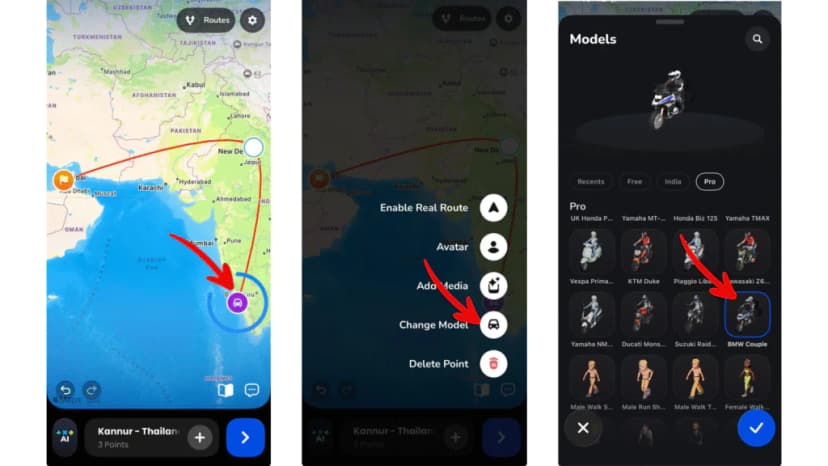
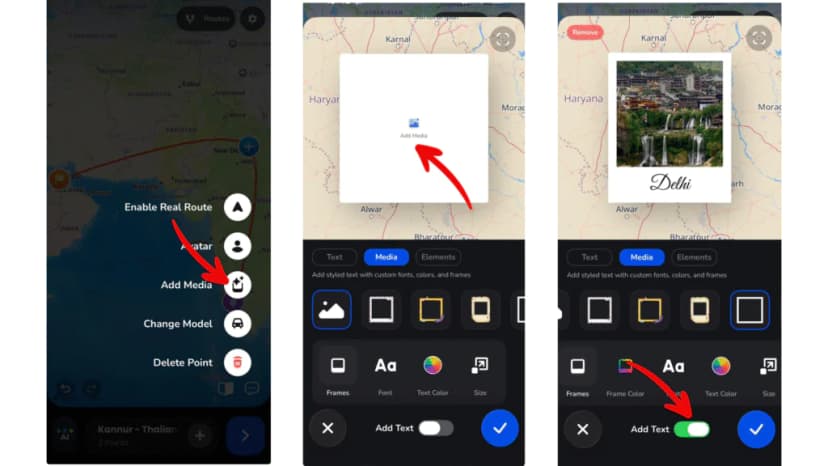
  5. Add images and labels at the needed points to personalize your travel recap. You can also customize the photos and labels, such as frames, colors, duration, size, etc. 
  6. Preview the video to see how your animation looks now. 
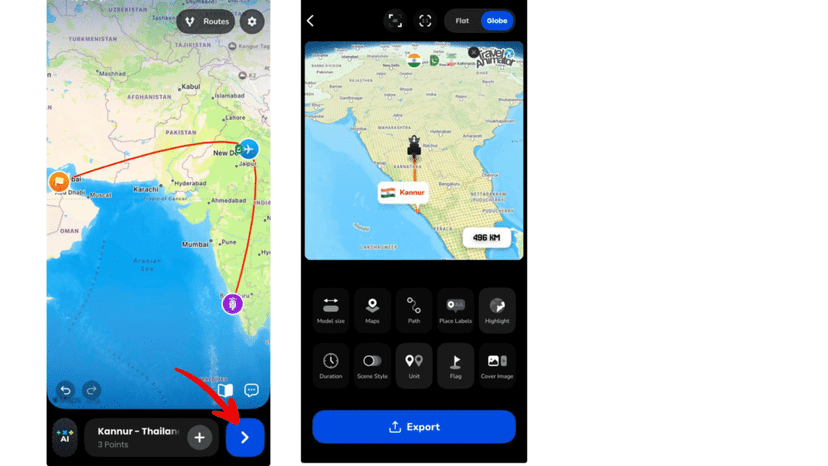
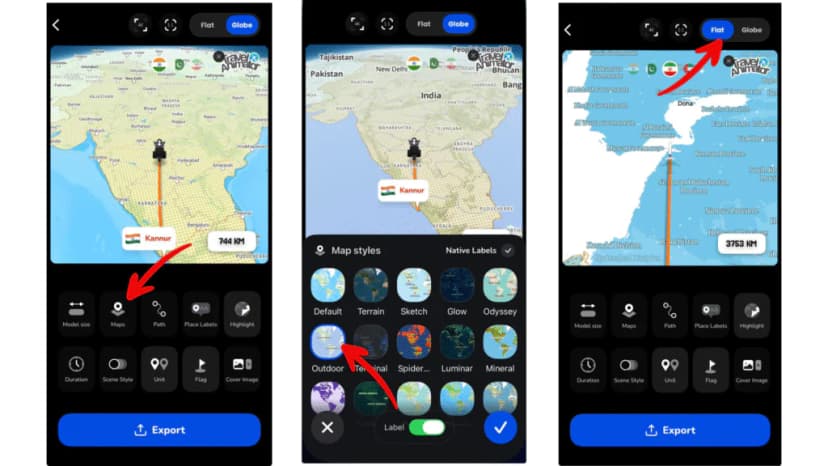
  7. After that, select the suitable map style and then 2D/3D. 
  8. Then, adjust the ratio, video duration, model size, line customization, etc. 
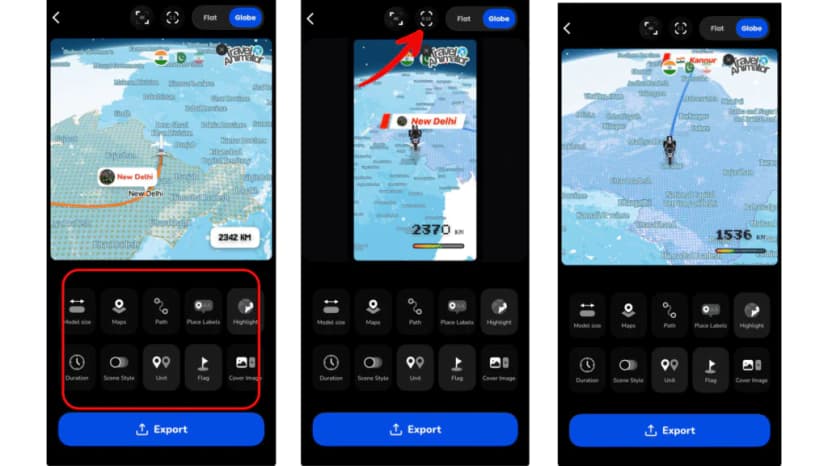
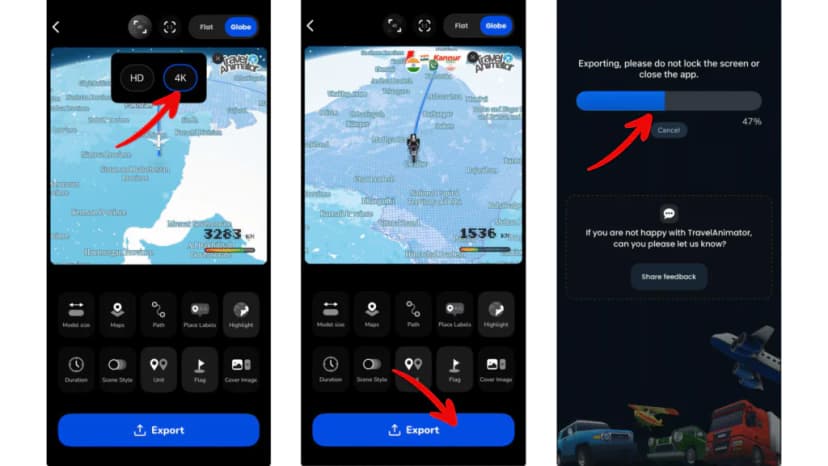
  9. Once ready, export your travel recap video in HD or 4K quality and save it to your device. Or share directly on social media. 
Travel Recap Videos for Social Media

Travel recap videos are especially effective on social media platforms. Short, animated map videos quickly capture attention and tell a complete story in seconds.

TravelAnimator supports vertical video formats, making it ideal for Instagram Reels, Instagram Stories, YouTube Shorts, and TikTok.

Instead of posting random photos, a travel recap video gives your audience. They can see all in one engaging visual, including where you started, how you moved, and where you ended. This format increases watch time, engagement, and shareability.

TravelAnimator as a Digital Travel Recap Book

Over time, TravelAnimator can act as your digital travel recap book and become more than just a recap tool. Each animation you create becomes a chapter of your travel life. You can save multiple journeys, organize trips by year or destination, revisit past routes anytime, and compare journeys visually.

Instead of storing memories across different platforms and folders, your trips stay structured and easy to revisit. For frequent travelers, this creates a personal archive of journeys that grows with every trip.

Who Is This Travel Recap App For?

TravelAnimator is built for a wide range of users.

  • Solo travelers use it to document personal journeys. 
  • Backpackers rely on it to recap long multi-country trips. 
  • Families use it to preserve vacation memories. 
  • Content creators turn recap maps into engaging social media content. 
  • Travel agencies and tourism boards use it to showcase routes and itineraries visually.

Travel Recap App vs Traditional Photo Albums

Traditional photo albums focus on moments, but they often miss the bigger picture. You might remember where a photo was taken, but not how you got there or how far you traveled.

Travel recap apps add structure. Instead of random images, you get a complete timeline of the journey. Animated maps provide context, scale, and flow that static photos can’t. While photo albums are great for memories, travel recap maps are better for storytelling.

Why TravelAnimator Is a Smart Choice for Travel Recaps

TravelAnimator stands out for combining user friendliness with storytelling. You don’t need editing skills, design knowledge, or expensive software.

The app is fast, mobile-friendly, and focused on travel visualization. With features like 2D and 3D maps, route customization, and social-media-optimized exports, it offers everything needed to create travel recaps in minutes.

Turn Your Trips into Memorable Travel Recaps

Every journey tells a story, and those stories deserve more than scattered photos and forgotten routes. A travel recap map brings your experiences together into a living, visual memory you can replay, share, and cherish.

With TravelAnimator, creating a stunning travel recap is simple, fast, and enjoyable. Whether you’re traveling once a year or every month, your journeys can live on as animated stories that show where you were and how you traveled.

Open TravelAnimator, start mapping your memories, and turn your trips into travel recaps that truly come alive.