How to Use TravelAnimator App: Step-by-Step App Guide (2026)
To use Travel Animator, add your starting point, destination and any stops, then choose a vehicle model. Customize the map and labels, preview the route and export a video. You can also import a Google Maps link or GPX file instead of plotting stops manually.
 Jaseel S12 min read
In this article 8 sections
TravelAnimator is a beginner-friendly app that turns any route into an animated map video in a few minutes, with no editing software or technical skills required. Whether you’re documenting a road trip, recreating a past journey, or showcasing an international flight path, it gives you a simple way to visualize movement on a map.
Imagine you’re travelling from Spain to Dubai to watch a cricket match. Instead of sharing static screenshots or scattered photos, you can build a smooth animated route that shows the whole journey step by step, complete with a vehicle model, a map style, a real road or flight path, and your own personalized labels.
Here’s exactly how to use it, from download to export, exploring all the features of the TravelAnimator and discovering how this amazing app can help you create stunning travel maps.
If you prefer to follow a complete example as you work, explore the start-to-finish travel video tutorials alongside this app walkthrough.
TravelAnimator is rated 4.6 out of 5 on the App Store, and it’s built by Lascade, a mobile app studio with a 40+ person engineering and design team.
What Is TravelAnimator?
TravelAnimator is a mobile app (iOS and Android) that lets you build animated travel map videos using routes, vehicle models, photos, and customizable map styles.
People use it to:
- Create travel route animation videos
- Share travel recaps on social media
- Plan future itineraries
- Recreate past adventures
- Animate road trips, flights, cruises, train journeys, and bus routes
- Animate road trips, flights, cruises, trains, buses, and more
It works through taps, previews, and built-in customization controls, which differ from traditional tools like After Effects or complex video editors. That’s the main thing that makes it fast for non-editors.
When a particular control is unfamiliar, the app feature walkthroughs explain what it changes before you preview your route.
Who Can Use the TravelAnimator App?
The travel animator app is ideal for a wide range of people, including
- Travel vloggers and content creators sharing visual travel content
- Solo travellers planning trips and families building vacation itineraries
- Adventure seekers mapping unique routes
- Travel agencies and tour operators are displaying destination maps on their websites or creating animations instead of pdf
- Media teams, documentary makers, and journalists producing route-based video content
- Faceless content creators monetizing YouTube without appearing on camera
- Students building historical or geography content for educational purposes
How to Create a Travel Map Animation – Step-by-Step Tutorial
Download and Sign Up
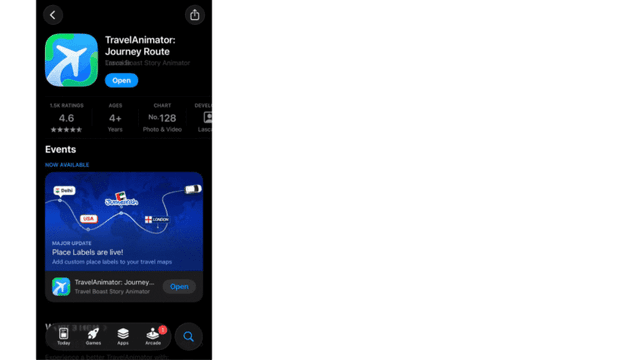
- Download TravelAnimator from the App Store or Google Play Store and open the app.
- Go to app settings
- Sign up using a Google account. Signing up is optional but recommended if you want to upgrade the app or save routes.
Start Your Journey
1. Tap Add Locations, then search for your location on the Starting Point. You can now search by city or place name, Latitude and longitude coordinates, and airport IATA code (e.g., DXB → Dubai International Airport).
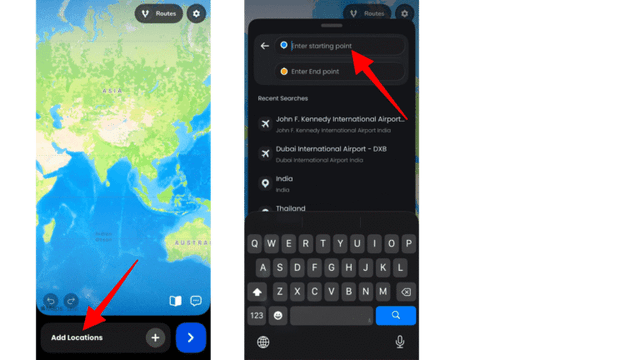
2. Then add your Starting point and End point Destination.
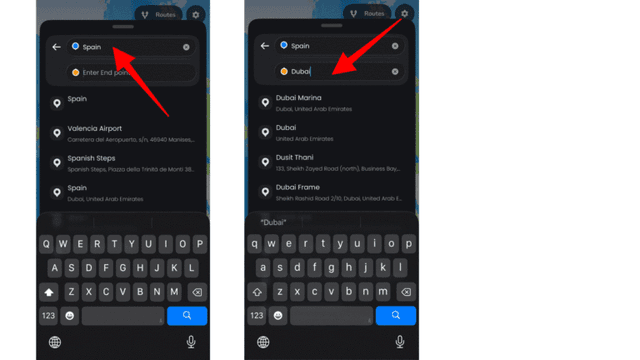
- Use the + icon to add multiple stops and drag to reorder stops if needed. Instead of adding stops manually, you can also paste a Google Maps link or upload a GPX file to plot the route automatically.
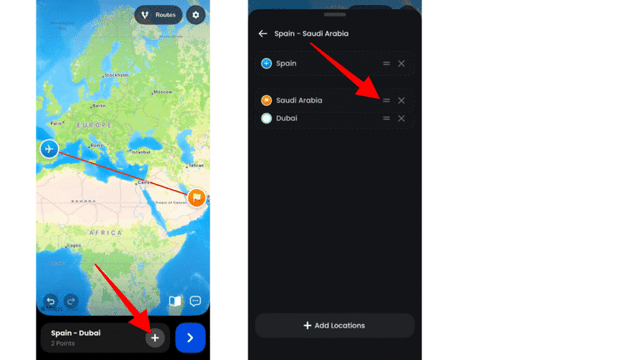
4. Utilize various features like,
- Tap on the travel line between the locations to add curves or stops.
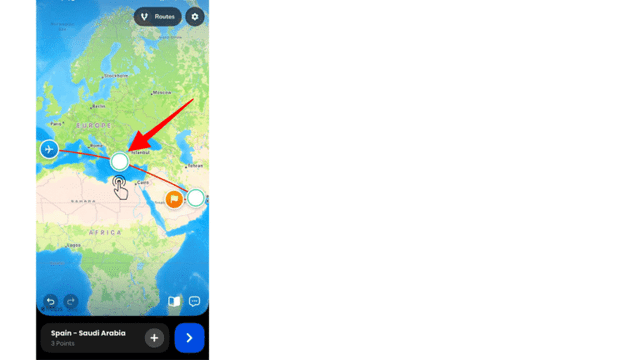
- Double-tap a point, or long-press it and select Delete Point, to remove it.

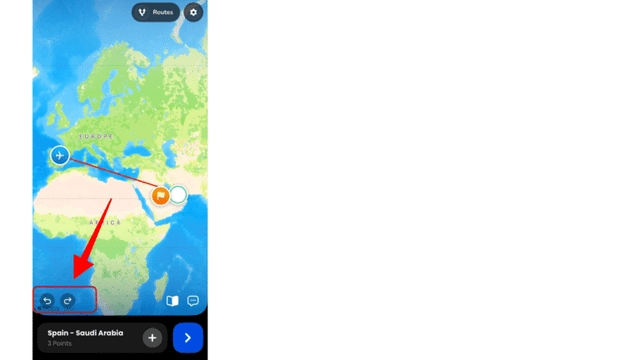
- Use the undo and redo options if needed.
- Long-press the point, then select the change model option to choose a suitable travel model from a large library.
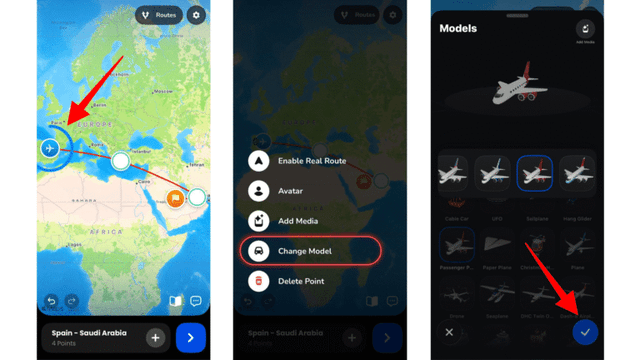
- Add and customize Text, Media (either photo or video), or 3D Elements from the Add Media option when long-pressing the point.
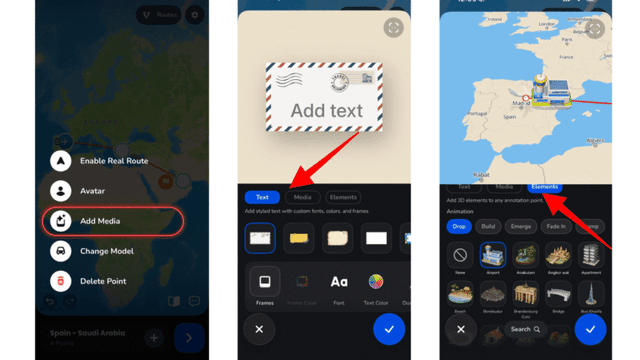
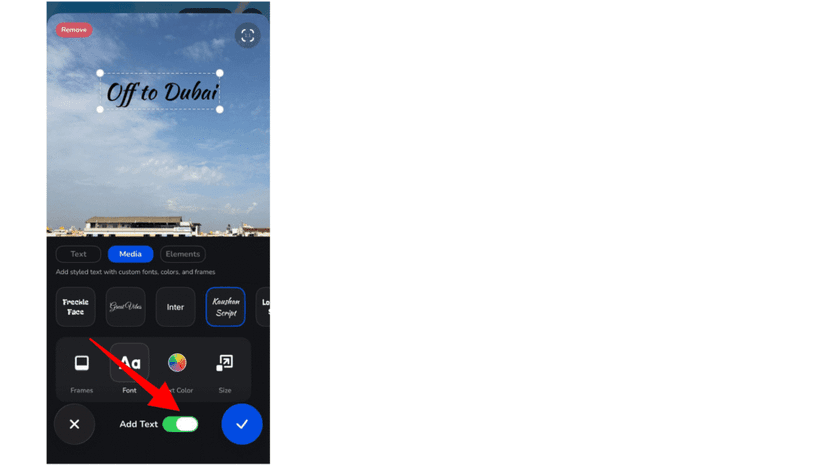
- You can use text and media together from the media option.
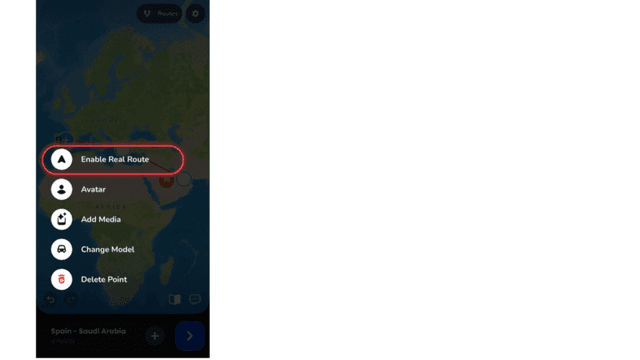
- Enable real routes by long-pressing the point you need.
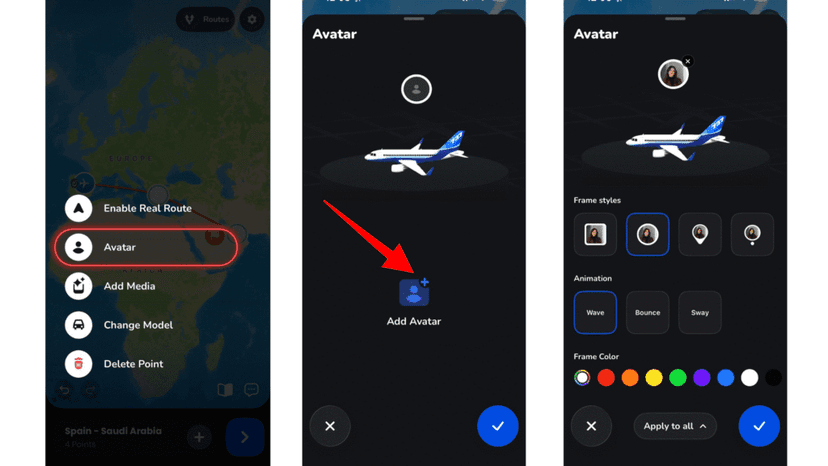
- Set up your Avatar by uploading your own photo so you ride along the route as yourself, rather than a generic vehicle icon.
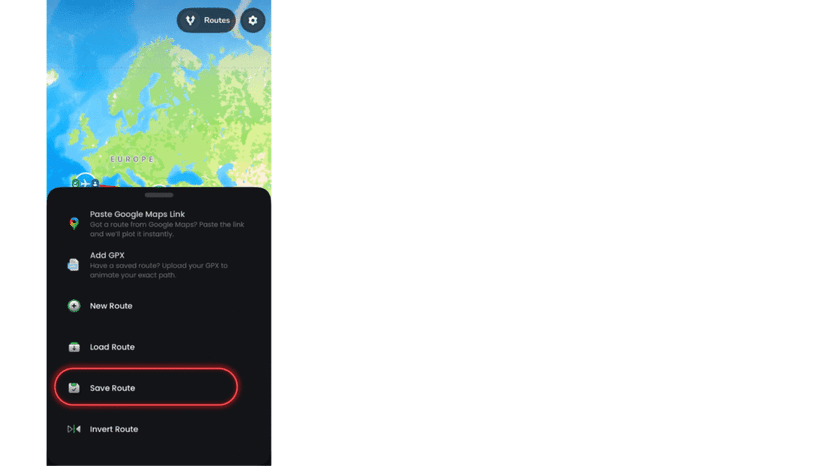
- Save routes from the Routes menu.
The free version allows you to customize your animation video with basic options. Upgrade to the Pro version to explore advanced customization in the animation, such as pro models, unlimited saved routes, using saved routes, and more.
Preview and Adjust the Features
1.Tap Preview Video to watch an animated video about your life journey.
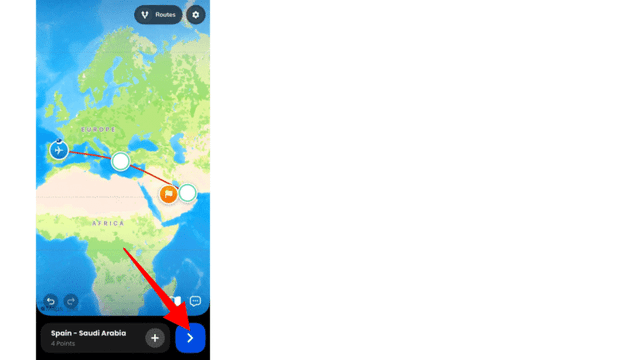
2. You can adjust features like
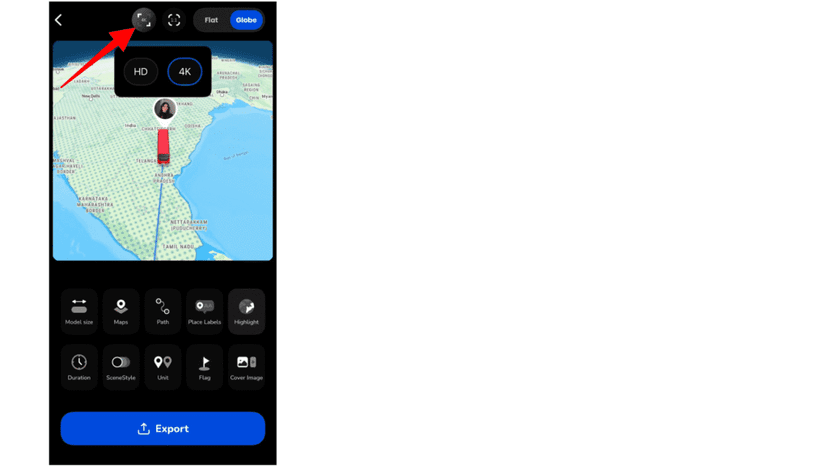
- Resolution
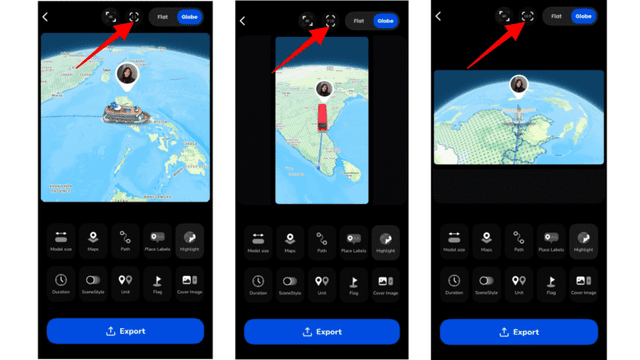
- Aspect ratio – choose the output dimensions to match where you’re posting, whether that’s Instagram, YouTube, or a presentation.
- 2D or 3D maps – switch between a flat map and a tilted 3D perspective for a more cinematic look.
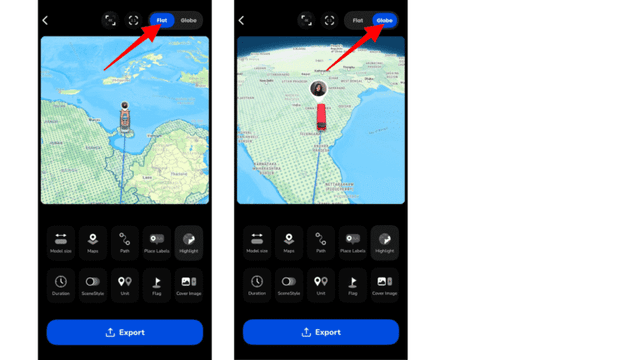
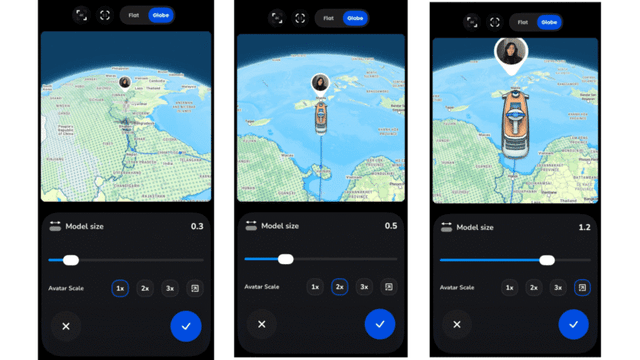
- Model size – Scale your vehicle model up or down so it’s proportional to the map and doesn’t overwhelm the route.
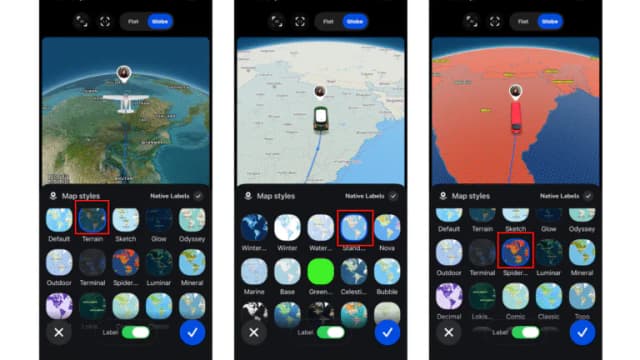
- Map style – Pick from 30+ visual themes, including satellite, blueprint, and seasonal looks like winter.
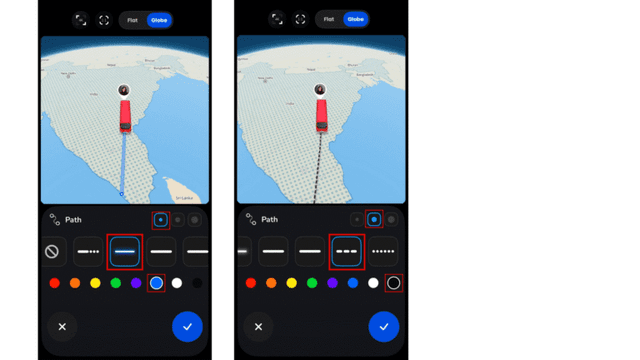
- Path line customization – set how the travel route is drawn to fit your video’s visual style.
- Place label customization – edit the location name that appears at each stop
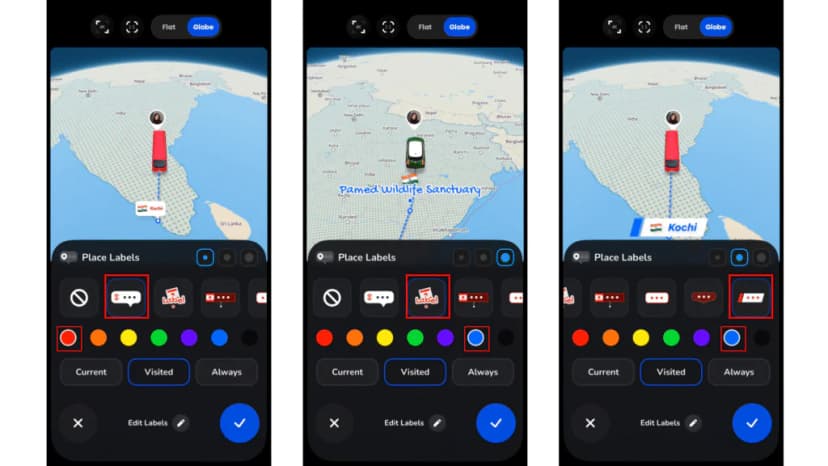
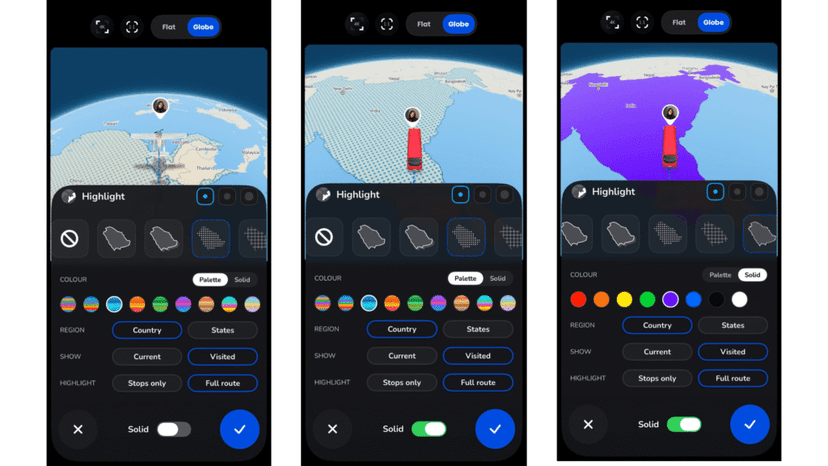
- Highlight – Draw attention to a specific region or stop so viewers notice it first.
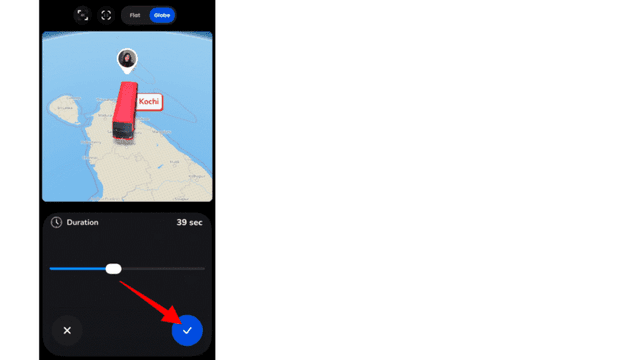
- Video duration – set how long the full animation runs, from a quick clip to a longer, more detailed journey.
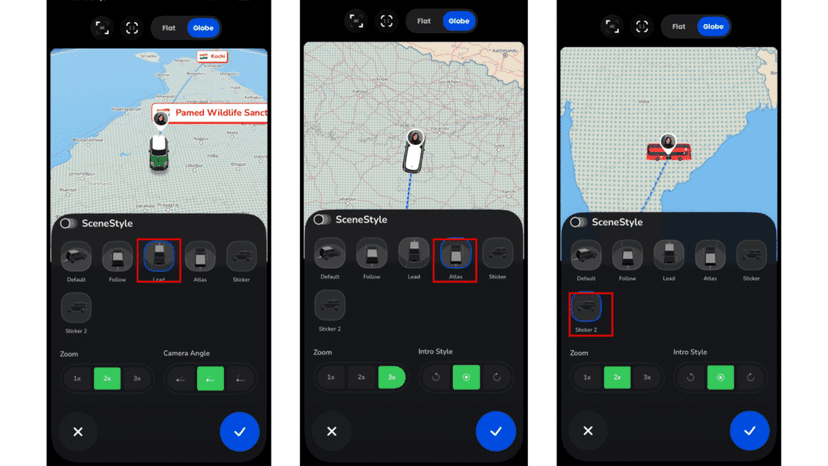
- SceneStyle – Choose from different cinematic camera movements and zoom effects as the route plays out.
- Distance Unit – Switch the displayed unit to match your audience.
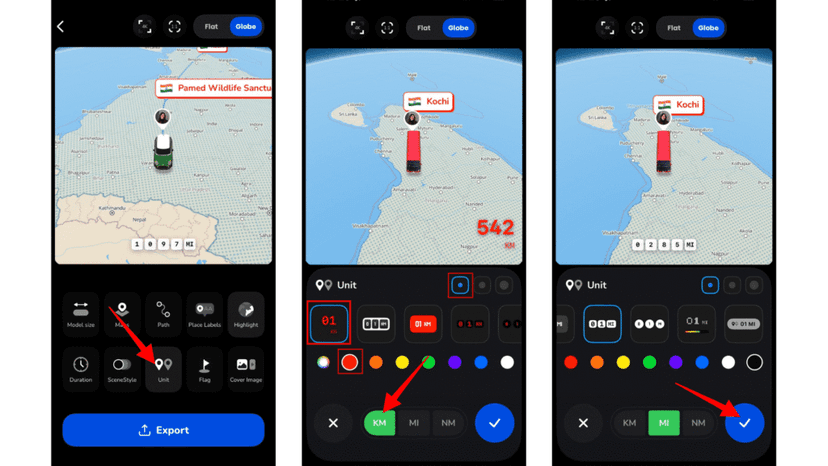
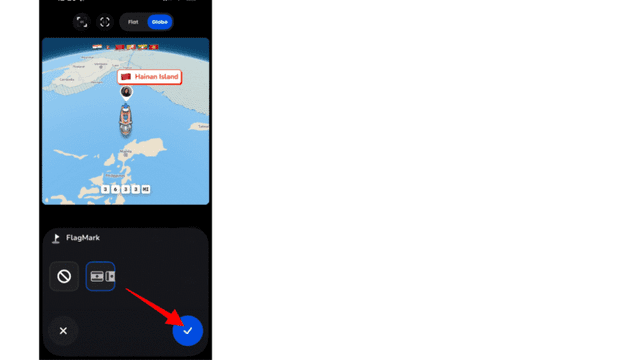
- Country Flag – Choose the best design to show the flag of each country your route passes through.
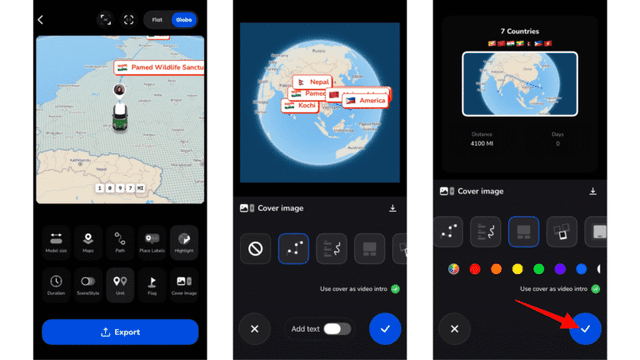
- Cover Image – Set a frame that opens the video, useful as a thumbnail or intro.
Upgrade to the Pro version to explore advanced features like custom maps, 4K resolution without watermarks, and more.
10. See your destinations come together for a clear visualization of your journey.
Save and Share
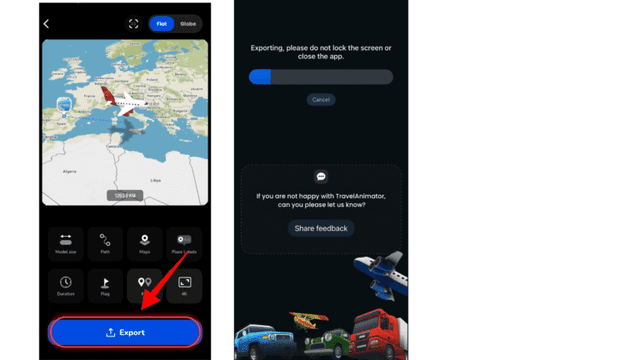
1.Export the video to your devices in HD. Upgrade the app to export 4K video without a watermark and in ad-free mode.
2. You can directly share the animation video on social media to show the world.
TravelAnimator Free vs. Pro – Overview
You can create a full animation on the Free plan, which includes 10+ free models, default map selection, a watermark on export and many customizations. Pro removes the watermark, unlocks the full 300+ model and 30+ map library, and adds 4K export with logo customization option.
| Features | TravelAnimator Free | TravelAnimator Plan |
|---|---|---|
| Vehicle models | Basic models only | 300+ models, including real-world vehicles |
| Map styles | Default style only | 30+ 2D, 3D, and seasonal styles |
| Export | HD, with watermark | HD & 4K, no watermark |
| Saved routes | 1 route | Unlimited |
Pro is available as a monthly or yearly subscription, starting at $5.99/month or $24.99/year. See the full plans and pricing breakdown for the complete feature comparison.
Features Overview (Updated 2026)
Add curves or stops
Tap on the travel line between the locations to add curves or stops. Drag the line to adjust the curve for better visualization of the path.
Enable Real Routes
Turn on the Real Route option at any stop to make the path from that stop to the next follow actual routes instead of a straight line. If you want realistic routing across your entire journey, enable Real Route at every stop individually.
Google Maps Link Import
Paste a Google Maps link to detect and add the route automatically. This saves time and ensures accurate route placement without manual searching.
GPX File Upload
Upload a GPX file of your actual travel route to recreate the exact path you traveled. This feature is ideal for road trips, cycling routes, hiking trails, and professional route documentation.
Airport IATA Code Search
Search airports using their three-letter IATA codes, such as DXB or JFK, to quickly add international airports without typing full names.
Choose the travel model
Select the model from the large model library menu that suits your journey. Both free and pro-version models are available.
Add and customize photo
Add photos of specific locations on your map to create a visual story of your journey and keep the memories vibrant. Customize the photo to match the overall animation. Adding text to the photo helps to place both in one destination.
Add and customize text
Texts help to add important notes or specify the exact location in a single video when there are many places. Customize the text to align with the animation.
3D elements
It includes 80+ recognizable places (the Eiffel Tower, the Taj Mahal, Christ the Redeemer, and more), which you can place directly on the map.
Remove Points or curves
Double-tap on the point to remove the points. This allows you to simplify the way and correct the mistake.
Chat support icon
Instantly connect with our support team for help and guidance on creating Travel animation videos inside the Travel Animator app.
Help tutorial icon
It gives you quick access to step-by-step visual instructions for creating a travel animation. Tap it to see how to use the app and create your first animation.
Customizable aspect ratio.
You can adjust the aspect ratio to fit your needs, whether for Instagram reels, YouTube videos, or other purposes.
2D and 3D map style options
Create animations in either 2D or 3D map style for an immersive travel experience.
Customizable model sizes
This feature allows you to adjust the size of models on the map, Whether you want a bigger one to stand out or a smaller one to maintain a balanced look, you can scale the models according to your preferences.
Path line Customize
The Travel Animator lets you personalize your map by customizing the line. This feature makes your travel animation more visually appealing.
Set video duration
Control the length of the video according to your needs. You can create short videos for quick highlights and long videos for detailed journeys.
Map style
Choose from various map styles, including 2D and 3D, such as default, classic, satellite, and more, to match the theme of your animation. You can upgrade to a Pro to explore different types of maps.
Add flags
Highlight your destinations with flags to make your animation more engaging and attractive.
Measurement units
Customize units in kilometers or miles to calculate the distance you traveled.
HD/4K output
To enhance the beauty of your animation, export it in high quality and share it on social media. Upgrade to the pro version to download 4K content without a watermark.
Explore the top menus
- Get Pro
- Route menu
- Settings
Get pro
The buttons allow you to upgrade to the Travel Animator app’s pro version (link) to explore premium features. Pro versions offer monthly and annual subscriptions, so you can choose the option that best suits your needs. Upgrading to the Pro version unlocks additional features, including premium map styles, more vehicles, 3D videos, and 4K export.
Route menu
Provide quick access to some features for easy route management.
- Paste Google Maps Link: If you already created a route in Google Maps, you can simply paste the link into this section. TravelAnimator will automatically detect the route and plot it instantly on the map.
- Add GPX: If you have a saved GPX file from a GPS device, cycling app, hiking tracker, or road trip recording, you can upload it directly here.
- New Route: Tap this option to start creating a completely new route from scratch. This clears the current route and allows you to add a new route.
- Load Route: Easily explore saved routes here. Access this section to view, edit, or continue working on the video you’ve previously created. Whether you’re planning to revisit a past adventure, you can easily check the travel plans and destinations.
- Save Route: Use this option to save your current route for later use. Free users can save one route at a time. Pro users can save multiple routes without limitations.
App Settings
The app settings provide various features and configurations to enhance user experience. Additionally, you can learn more about the app, its features, and its functionality. This section includes
- Opportunity to Collaborate
- Partner with TravelAnimator
- Support Forum
- Create a custom model option
- Change language
- Access to restart tutorials
- Remove watermarks option
- Social profiles to follow
- User ID
- Apply promo codes
- Restore Purchase
FAQS
How do I remove watermarks from the video?
The pro subscription lets you remove watermarks from your videos, giving your content a professional look.
Are all vehicle models free in TravelAnimator?
The Travel Animator app does not offer all models for free. It offers a limited selection of basic models, including cars and motorcycles.
A Pro subscription unlocks access to a large library of models, making your animations more dynamic and interesting.
Does Travel Animator work on Android?
Yes, Travel Animator works on Android. You can download the app from the Play Store to create stunning animation videos on your Android device.
Where is the delete button in TravelAnimator?
- To delete Destinations or stops, double-tap on the destinations or stops to delete them. This allows you to correct mistakes and adjust the routes quickly.
- To delete projects, navigate to the Route menus section in the map. Tap New Route to clear the entire project and create a new one.
Is Travel Animator secured and trustworthy?
Yes, Travel Animator is developed by Lascade, a trusted company that provides high-quality, user-friendly apps. We enhance digital experiences with a blend of tech expertise and creativity. We prioritize your information and adopt strong security measures to guard against unauthorized access.
Start Creating Travel Animations Today
TravelAnimator makes it easy to turn any journey into a visually engaging animated map. Whether you’re showcasing a road trip, mapping a flight route, visualizing a train journey, presenting a bus trip, highlighting a cruise path, or building a professional travel itinerary, the app gives you the tools to do it all in just a few simple steps. You don’t need editing experience, complex software, or high-end devices. With customizable routes, vehicle models, real-world path options, map styles, and export controls, TravelAnimator simplifies the entire travel storytelling process.
If you’re ready to transform your travel routes into dynamic, shareable animations, download TravelAnimator today from the App Store or Play Store and start creating travel map videos in minutes.