How to Create a Travel Animation Video with Google Maps
To import a Google Maps route into Travel Animator, copy its share link, open the Route menu and choose Paste a Google Maps link. Paste the link, tap Plot Route and check the imported stops before previewing and exporting your video.
 Jaseel S5 min read
Here is a great update from the Travel Animator app: Travel Animator now lets you either paste your Google Maps link directly into the app or share it straight from Google Maps using the Share menu. This new flexibility saves you time and simplifies the process without needing GPX files.
Whether you’re a travel blogger, content creator, or someone who loves documenting your journey, this feature makes it easy to bring your travel videos to life.
Let’s explore how to add Google Map links directly in Travel Animator and create travel routes without converting the Google map to GPX files.
What is this New Feature? Use Google Maps Link in Travel Animator Without GPX Files
Instead of converting a Google Map route to a GPX file for uploading in Travel Animator, you can now simply paste the Google Maps link into the app, or directly share it from Google Maps using the Share menu. Travel Animator will automatically detect the route and animate it for you.
Benefits & Importance of direct Google Map link feature
- No need to depend on third-party sites to convert your routes into GPX files. Now, you can simply copy and paste the Google Maps link into Travel Animator or directly share it from Google Maps using the Share menu.
- This feature is designed for everyone, even those creating a travel animation for the first time. So you don’t need any technical knowledge.
- Adding routes manually can sometimes miss stops and curves, resulting in formatting issues. This direct link method reduces such risks.
- Check the imported route against your itinerary before exporting.
- If you’re a travel content creator or blogger traveling, this shortcut makes the content creation process faster.
Steps to Add Google Maps Links to Travel Animator Without Converting to GPX
1. Generate Google Maps Links
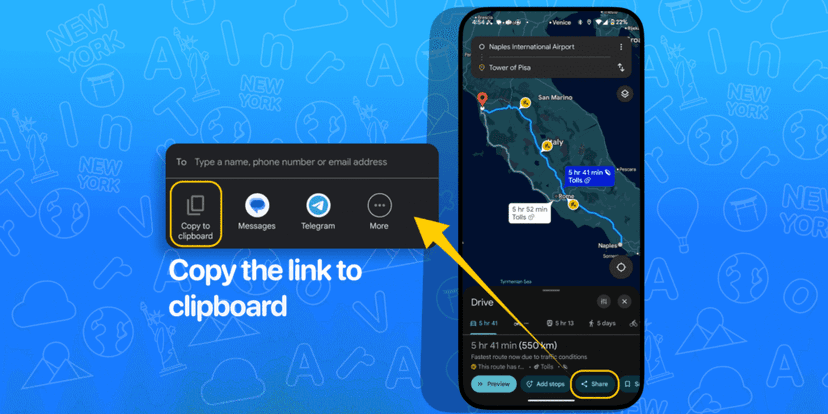
- Open Google Maps using the app or through your browser (like Chrome) on any device.
- Type your starting location in the Search bar and tap Directions to start creating your route.
- Add your first stop in the destination field, and Google Maps will draw a route between your starting point and your destination.
- Use the “Add stop” or “Add destination” option to add every location you need.
- You can drag and reorder the destinations if needed.
- Choose the travel mode: driving, walking, cycling, or public transport
- Tap on the “Share” icon on mobile devices or “Copy link” on desktop and copy the link.
- Now your Google Map link is ready to paste into Travel Animator.
2. Insert the Link in Travel Animator
- Open the Travel Animator app and sign up using an email address.
- Start a new project. Save any existing work before starting a new project.
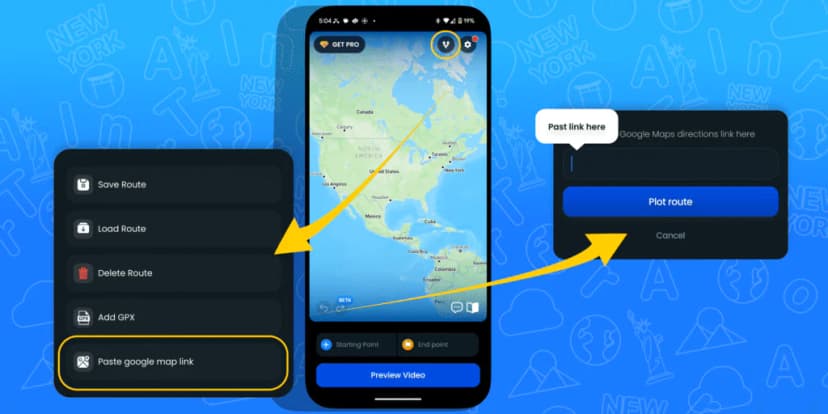
- Tap the “Route menu” and select “Paste a Google Maps link”.
- Paste the link there and tap “Plot Route” to make the route.
- The route will appear on the screen.
- To change the model, long-press the specific point you want to modify.
- You can add images and labels from the model menu.
3. Preview the Video
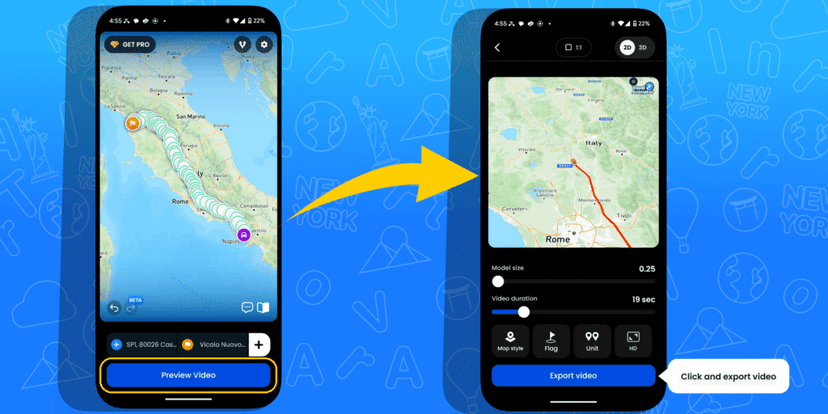
- Preview the video to see what the animation looks like.
- Adjust the ratios, model size, and video duration to enhance the overall look of your animation.
- Change the map style by upgrading to Travel Animator Pro.
- Toggle other features like Flag and Unit.
4. Export and Share the Video
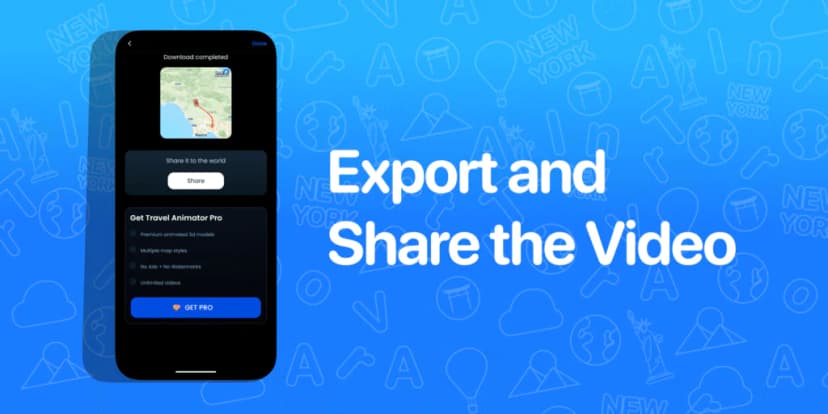
- Export the video in either HD or 4K quality. Upgrade to Travel Animator Pro to export in 4K quality.
- Export the video directly to your device.
- You can share the video directly on various social media platforms.
How These New Features Save You: Use Cases for Travelers & Creators
- Travel Bloggers can showcase their road trip or walking journey within a few minutes, making it easier for the audience to understand the route.
- Youtubers create an intro video that shows their journey before posting vlog content. It gives your video a professional look, and the audience becomes more engaged and curious.
- Tour companies and guides can quickly create their previews for different trips without depending on a designer.
- Students can make engaging learning visuals to explain historical routes in less time.
- Solo travelers can make an animation using their travel route to make their travel recap more fun and memorable.
Need a Simpler Way to Make Travel Videos?
The new feature of Travel Animator, which allows for direct copying of the Google Map link in Travel Animator, is a significant step forward in making the platform more convenient and user-friendly.
It will enable you to paste Google Maps links directly without depending on any third-party GPX converter. It eliminates the need for external tools, saves time, and reduces the effort of manually adding curves and stops in Travel Animator.
Whether you’re a content creator or traveller, this feature helps you create beautiful animation. All you need is a Google Map link, with no GPX files or other high-end tools.
Explore Travel Animator’s new feature today by downloading TravelAnimator Now from the Play Store or the App Store.
Before you export the imported route
Compare the imported stops and their order with your intended itinerary. If the result is unexpected, reopen the shared link in Google Maps and check that it contains the journey you meant to share. Do not delete an existing saved project just to test a link.
The route video is for storytelling, not live navigation. Preview the path, labels and chosen vehicle before exporting. If you already have a recorded track rather than a Google Maps link, follow the GPX import instructions.