Black & White Map Style in TravelAnimator
 Jaseel S4 min read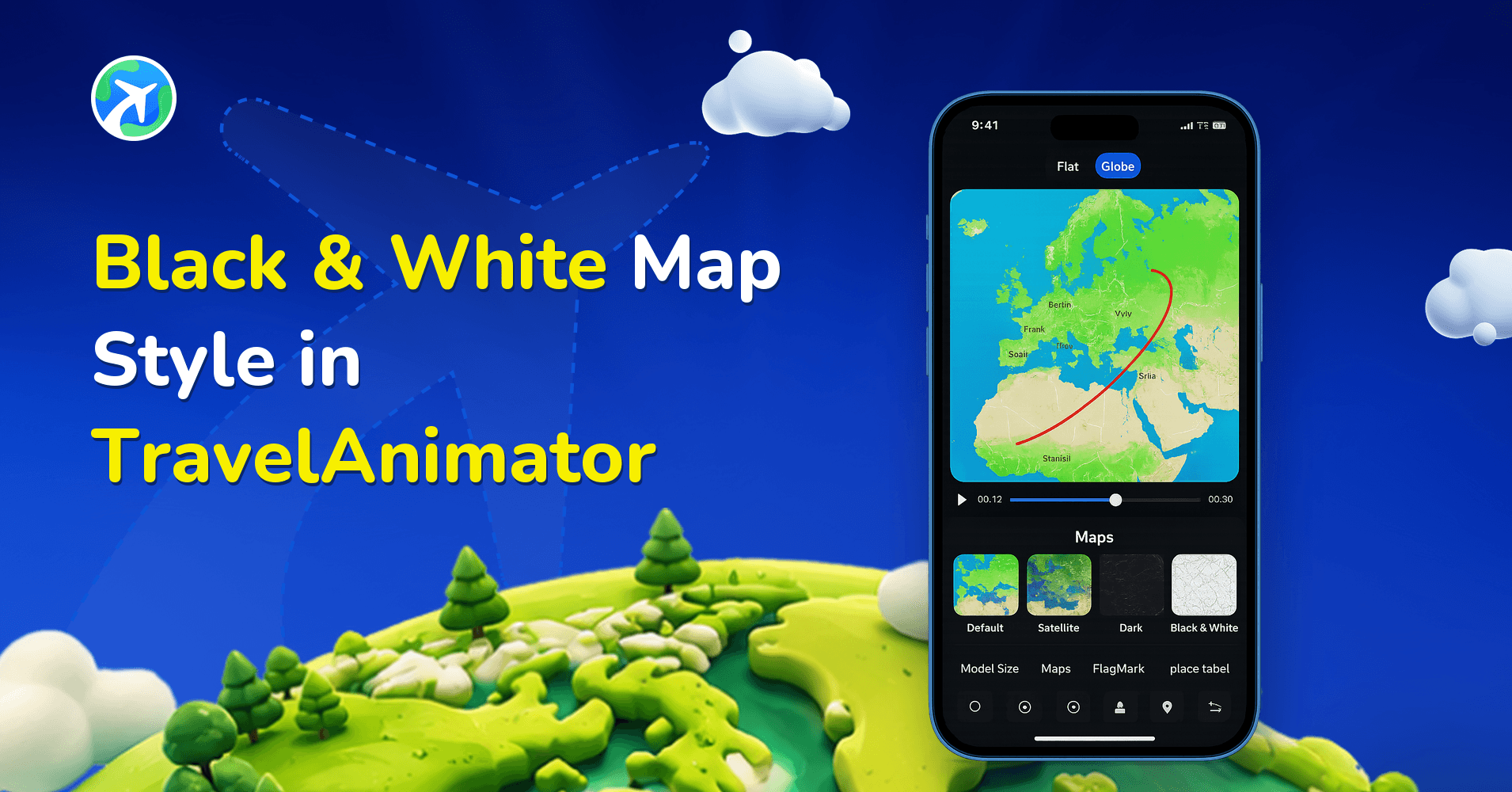
TravelAnimator has just introduced something new – the Black & White Map Style, a fresh and minimalist way to create powerful travel animations.
This new mode focuses purely on clarity and contrast instead of the colorful and festive map styles, such as Winter or Aural. It cleans away unnecessary colors and distractions, allowing your travel route animation to stand out and be different. Whether you’re creating a professional travel documentary, a minimalist storytelling reel, or simply want a clean aesthetic for your journey, this new map style adds experience to every route you animate.
This guide explains the new Black & White Map Style in TravelAnimator, its use cases, and steps to use it.
What Is the Black & White Map Style in TravelAnimator?
The Black & White Map Style is a visually minimal and rich map theme designed to highlight routes, models, and animation with stunning clarity. This map eliminates color-based distractions, relying instead on light and dark contrast to make your journey stand out. Land areas appear in white and gray tones, while routes and other elements on the map stand out against the monochrome background.
Upgrade to TravelAnimator Pro to get the Black & white map style in your animation video. This new map style works perfectly across both 2D and 3D maps, with the flexibility to choose the map that best suits your journey. In 2D, it offers a flat aesthetic map style that is ideal for clear route visualization. And when it comes to 3D, your travel route videos become even more engaging and visually appealing by highlighting your journey around the globe.
Why Choose Black & White for Your Travel Animations?
- The black & white map style is perfect for content creators, travel bloggers, and brands who want their videos to look clean, cinematic, and professional. It works especially well for presentations, reels, and travel documentaries.
- The Black & White map style is perfect for storytelling, as it gives your journey a nostalgic and emotional tone, much like watching a classic travel film.
- If your animation features bright-colored models, such as cars, buses, ships, or planes, the monochrome background makes them stand out beautifully. Labels, route line color, and flag become more striking.
- Black and white map style works for every type of travel story, including business trips, cross-country drives, historic explorations, or personal memory videos. This map style adapts to different moods and stories.
- With this map style, the audience can keep focus on the journey, most likely your route, movement, or destinations.
How to Use the Black & White Map Style in TravelAnimator
- Open the TravelAnimator app and choose an existing route or start a new animation.
- If you create a new route, add routes manually, import GPX files, or upload a Google map link.
- Long-press the points you need to change models and add images & labels.
- Preview the video and navigate to the maps.
- You’ll see the new Black & White style labeled with a NEW badge. If you didn’t see it, scroll through the options.
- Tap on it to preview the look of your map.
- Once satisfied, click Select to apply the style to your animation. You need to upgrade to the pro version of TravelAnimator to use the Black & White map style in TravelAnimator.
- Adjust other features to align with the overall animation and export it in HD/4K quality.
When to Use the Black & White Map Style in TravelAnimator
If you’re creating a short film or storytelling video, using a black & white map style adds cinematic appeal to the entire animation.
For corporate or professional projects, such as client presentations, company travel routes, or business journey animations, Black & White map style provides your visuals with a clean, brand-ready finish.
When crafting emotional or nostalgic journey recaps, the black & white style removes distractions and enhances storytelling through contrast.
If your travel route covers multiple countries or continents, the Black & White style keeps it visually clear and organized.
Pair the map with colored models, route line color and flag to create an artful and modern animation that feels both calm and dramatic.
Tips to Enhance Your Black & White Travel Animations
Use bright models and colors, such as green cars, red planes, or orange ships; they’ll pop beautifully against the muted background map.
Adding location names or other texts enhances storytelling while maintaining clarity in your animation.
Smooth and natural curves make your route feel natural. Combine this with the monochrome map for a cinematic result.
The 3D map’s perspective adds depth to a 3-dimensional video, making your monochrome route look dynamic by highlighting your journey around the globe.
Always preview the animation once to ensure your points, speed, and models align well with the black & white map theme.
Make Your Each Journey Cinematic with Black & White Map Style in TravelAnimator
The new Black & White Map Style in TravelAnimator adds a different vibe and a refined touch to your travel animations. It’s the perfect balance between simplicity and creativity, allowing your journey to stand out without distractions. Use it to tell your stories with smoothness, professionalism, and emotional depth. Open TravelAnimator today and try the new Black & White map style. Make your next journey bold, minimal, and stand out.