Travel Animator vs. TravelBoast
Travel Animator and TravelBoast are mobile apps for making animated route videos. Both support route imports and paid 4K export. Compare the editing controls, map styles and annotations using the same itinerary before choosing a subscription.
 Jaseel S8 min read
In this article 11 sections
Publisher disclosure: This guide is published by the team behind Travel Animator. It compares our product with alternatives and is not an independent review. Features were checked against the linked product documentation on September 17, 2026. Availability and purchase options can vary by app version, device and region.
Travel Animator and TravelBoast are two popular travel animation apps that allow users to create engaging animated travel videos using map-based routes, vehicles, and visual images.
Travel animation apps help travelers transform their routes and experiences into engaging videos to share on public or social media. These apps help document past travels or plan future itineraries. They were specifically developed to create travel animation videos.
If you’re searching for the best travel animation app, this detailed comparison will help you understand the strengths, limitations, and ideal use cases of Travel Animator and TravelBoast, so you can choose the right app based on your needs.
What Are Travel Animation Apps and Why Are They Popular?
Travel animation apps are designed to turn routes, destinations, and journeys into animated map videos. Instead of sharing static screenshots or long explanations, users can visually show where they traveled, how they moved, and what stops they made.
These apps are popular because they make travel storytelling easier and more engaging, help content creators stand out on social media and allow businesses to explain routes, tours, or itineraries visually. And also it requires little to no editing or animation skills. Both Travel Animator and TravelBoast were built for this purpose, but they approach the problem differently.
Overview of Travel Animator and TravelBoast
Travel Animator is designed to create professional-quality travel animation videos without requiring technical or editing skills. The app focuses on visual storytelling, customization, and high-quality exports, making it suitable for travelers, content creators, students, and businesses.
TravelBoast is a user-friendly travel animation app that emphasizes simplicity and quick results. It is often used by casual travelers who want to create short animated routes with minimal effort.
Feature Comparison of Travel Animator & TravelBoast
| Feature | Travel Animator | TravelBoast |
|---|---|---|
| Platform | iOS and Android | iOS and Android |
| Route input | Manual stops, GPX and Google Maps links | Manual stops and GPX; Google Maps support documented |
| Video export | HD; 4K with Pro | 4K with a subscription |
| Decoration | Vehicles, text, media and place labels | Vehicles and photo/video annotations |
| Route line | Colour, thickness and styles | Colour, thickness and styles |
| Purchase options | Free tier and Pro subscriptions | Free download and subscriptions |
Pros and Cons of the Travel Animator App
Pros
- Add locations using a Google Maps link or the location coordinates from the search bar.
- Advanced customization, including route styles, labels, images, colors, and map themes
- Wide range of map styles, suitable for different storytelling needs, including 2D and 3D
- 300+ models, including realistic models are available
- You can directly enable real routes for specific stops or more
- Undo and redo features, reducing editing stress
- High-quality HD & 4K export, ideal for social media and professional use
Cons
- Travel Animator doesn’t support the desktop.
- Visual effects like stickers or motion effects are limited compared to TravelBoast
Pros and Cons of the TravelBoast App
Pros
- Fun visual effects to enhance animations
- Undo and redo features, reducing editing stress
- Wide variety of travel models are available
Cons
- Map styles available; preview the selection in the app to align with different travel themes
- Compare the annotation and label controls on your own route before choosing
Key Features That Set TravelAnimator Apart
Route Creation with Multiple Input Options
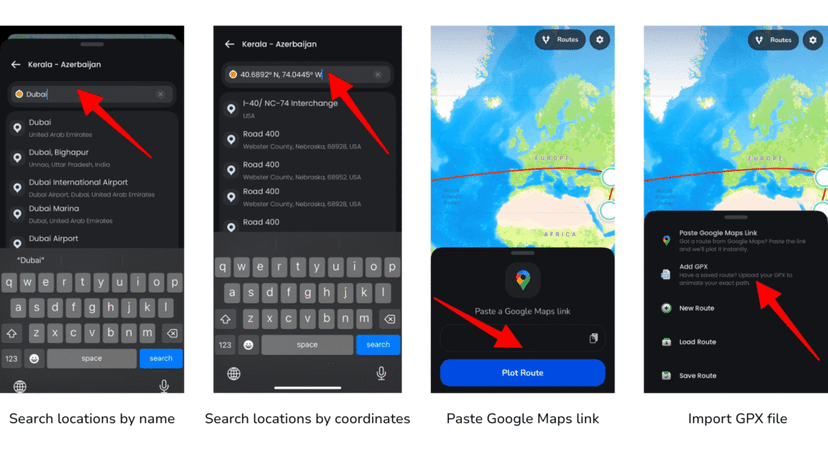
TravelAnimator allows you to create routes in several flexible ways. You can search locations by name, paste Google Maps link, enter coordinates, or import GPX files to recreate real journeys accurately. This makes it easy to animate both planned trips and real-world travel data.
Rich Model Library for Different Journeys
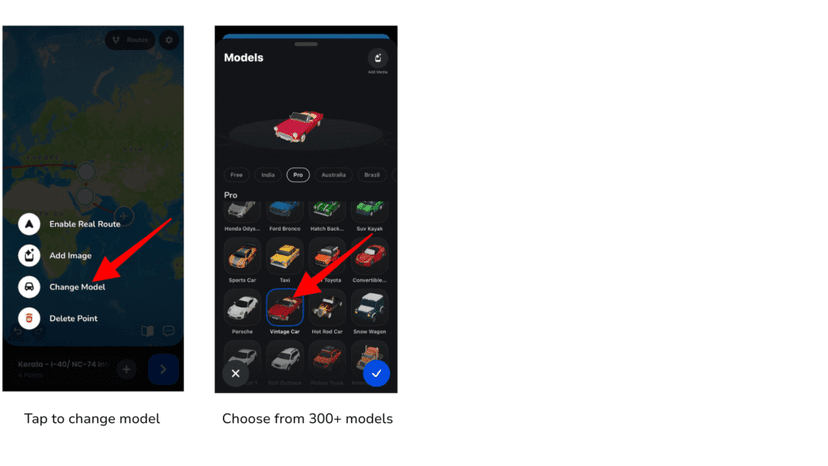
TravelAnimator includes 300+ travel models, such as cars, bikes, buses, planes, ships, festive models, vehicles from different countries, and seasonal characters. These models help represent how you actually traveled, making the animation feel more personal and realistic.
Advanced Route Line Customization
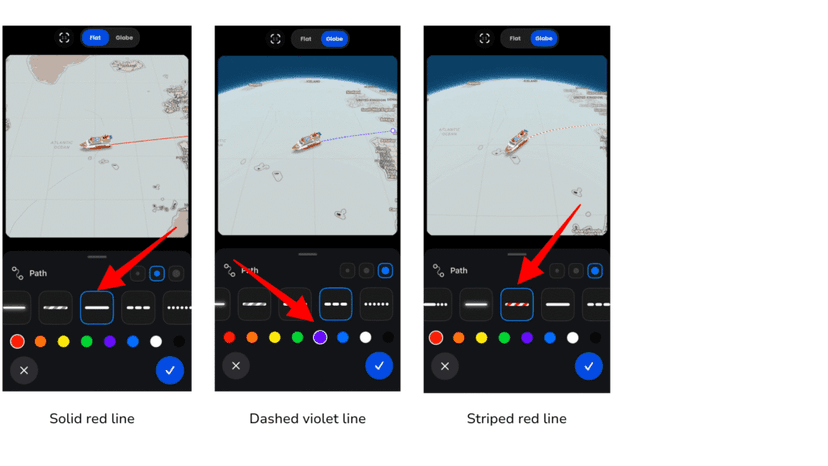
TravelAnimator lets you customize how your route looks on the map. You can change the route color, thickness, and style (solid, dotted, dashed, glowing, hybrid) to match your journey’s theme or platform requirements.
Wide Range of 2D & 3D Map Styles
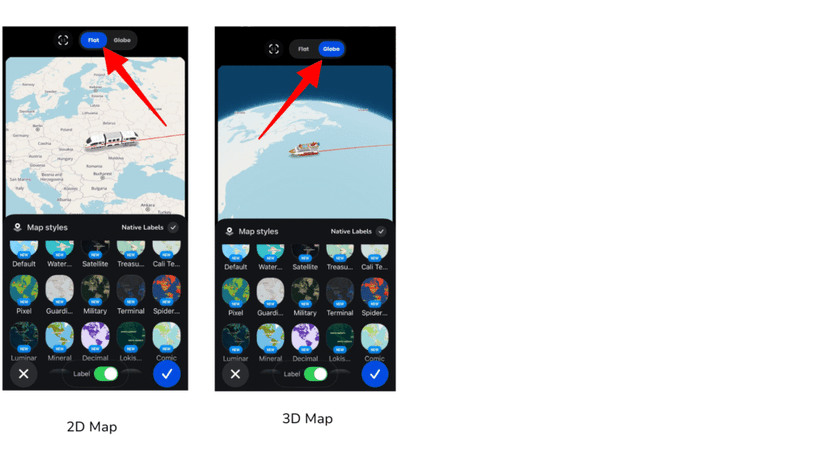
TravelAnimator offers a large collection of map styles, including light, dark, winter, black-and-white, and 3D Earth views. These options help creators choose the right visual mood for road trips, flights, cruises, educational videos, or professional presentations.
High-Quality HD & 4K Video Export
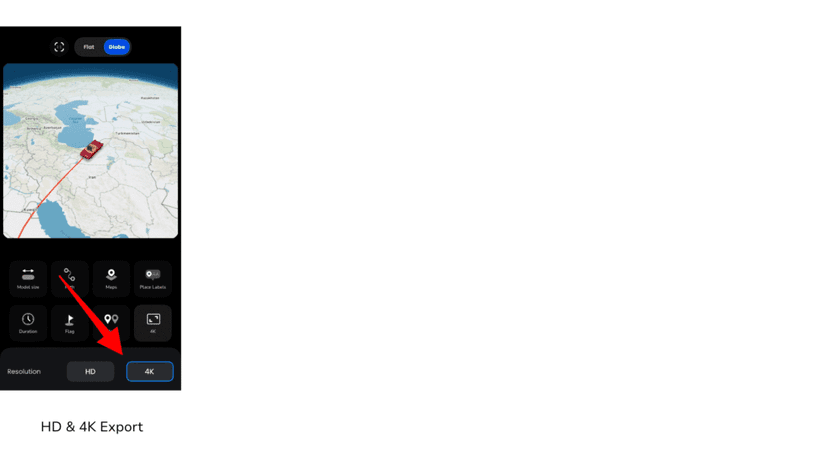
With TravelAnimator, users can export videos in HD or 4K quality. This ensures sharp visuals for Instagram Reels, YouTube videos, presentations, and professional travel content. High-resolution exports help your animations look polished and credible.
Images, Text, and Place Label Customization
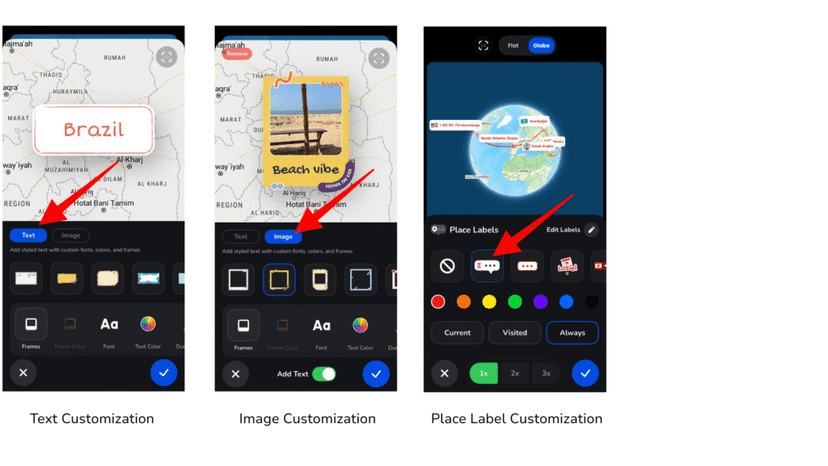
You can enhance your travel story by adding images, text captions, and place labels at different stops. TravelAnimator allows you to style frames, adjust colors, control visibility, and fine-tune label placement so the animation and each features aligned.
Undo and Redo for Stress-Free Editing
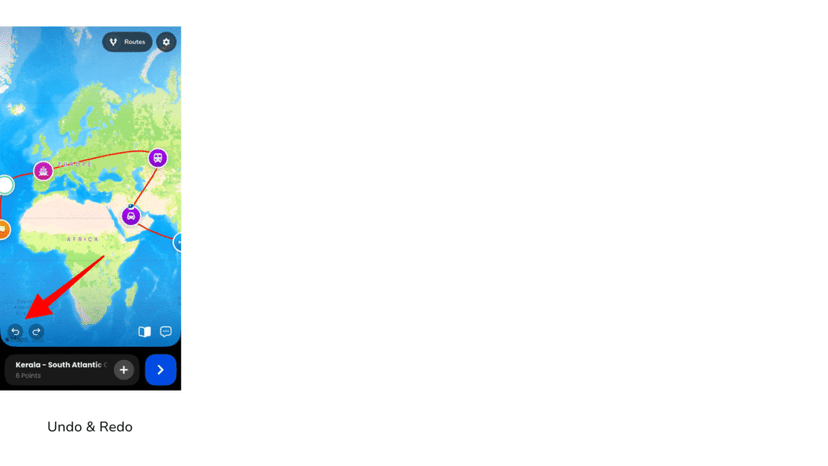
TravelAnimator includes undo and redo buttons that let you reverse or reapply route changes instantly. This feature saves time, reduces frustration, and allows creators to experiment freely without fear of mistakes.
Optimized for Social Media and Presentations
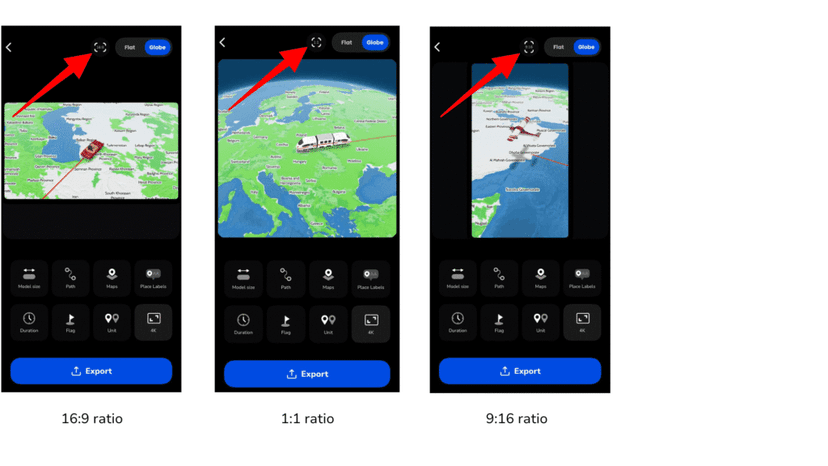
TravelAnimator supports multiple aspect ratios such as 9:16, 16:9, and 1:1, making it easy to create content for Instagram Stories, Reels, YouTube, WhatsApp Status, or business presentations, all from the same project.
Use Cases: Which App Is Best for Different Users?
- Travel bloggers and Influencers—A Wide range of customisation and high-quality videos help create engaging content for social media. They can choose suitable map styles to showcase different trip experiences. Try both apps with the same route and compare the map styles and editing controls. Both offer paid 4K export.
- Casual travelers—User-friendly app for those who want quick and simple videos to showcase their itinerary without spending too much time on editing. Both apps perform best when creating basic travel animation videos.
- Content creators—Educational, historical, or storytelling creators benefit from high-quality visuals and multiple map styles. Travel Animator offers scene and label controls for this workflow. Resolution alone does not distinguish the two apps: both offer paid 4K export.
- Train Travelers—You can create videos using different models of your travel experience, using the vehicle you are traveling in. Both TravelAnimator and TravelBoast provide train models to document the journey, making your experience animated. TravelAnimator has a special metro train model to make your animation more personalized.
- Businesses and marketers—Travel agencies, tourism boards, and logistics teams require professional visuals and real-route accuracy. TravelAnimator performs well, with support for GPX, Google Maps integration, and high-quality exports.
Which Travel Animation App Performs Best?
Both Travel Animator and TravelBoast offer valuable tools for creating travel animation videos. However, Travel Animator stands out for users who prioritize quality, customization, and storytelling flexibility. With its advanced features, high-resolution exports, and wide range of map styles, Travel Animator is well-suited for travelers, creators, travel agencies, and businesses looking to produce professional and engaging travel videos. If you want to turn your journeys into visually rich stories, compare a short test export in both apps before choosing a subscription.
Download Travel Animator from the App Store or Play Store today and explore its features to start creating stunning travel animation videos.
Questions to check before choosing
Can both apps export in 4K?
Yes. Travel Animator includes 4K export in Pro, and TravelBoast lists 4K export among its subscription features. Check the plan shown in your app before purchasing.
Does TravelBoast support Google Maps?
TravelBoast documents Google Maps support in its editing tutorials. Travel Animator also supports Google Maps links; follow our Google Maps import guide to try your own itinerary.
How should I compare the apps fairly?
Use the same three stops, one photo and the same video format in each app. Check label readability, route shape, editing effort and the exported result before paying. A larger feature list is only useful if those features help your project.
Sources and further reading
See the TravelBoast subscription FAQ, TravelBoast editing tutorials and Travel Animator plans for the capabilities discussed here.
Frequently Asked Questions
What Are Travel Animation Apps and Why Are They Popular?
Travel animation apps are designed to turn routes, destinations, and journeys into animated map videos. Instead of sharing static screenshots or long explanations, users can visually show where they traveled, how they moved, and what stops they made.
Which App Is Best for Different Users?
Travel bloggers and Influencers—A Wide range of customisation and high-quality videos help create engaging content for social media. They can choose suitable map styles to showcase different trip experiences.
What should I compare when choosing Travel Animator or TravelBoast?
Compare how you want to build routes, the available transport models, customization and export options. Choose the workflow that fits your trip videos and check the current plan details before upgrading.