The Best Free Mult.dev Alternative in 2026 (No Video Limit)
 Jaseel S11 min read
In this article 11 sections
If you’ve been using Mult.dev, or typed “Mult dev” into a search bar and landed on its free plan, you already know the problem: five videos, and then you’re done without paying. For casual travellers and social media creators who just want to share their journeys without a credit counter, that’s a frustrating wall to run into.
TravelAnimator is the free alternative most people switch to. It gives you lifetime free access with no video limit, HD export, and a mobile-friendly experience built specifically for travellers who create while on the go.
This article will guide you through how the two tools compare with real 2026 data, how TravelAnimator becomes a free Mult.dev alternative and how to create travel animation videos using TravelAnimator in just a few steps.
Our testing process
We compared the free versions of Mult.dev and TravelAnimator by creating the same five-stop journey from London to Tokyo using identical settings and options. We compared route options, transport modes, customization features, export quality, and limitations of the free plans to understand how both tools perform in real-world travel scenarios. Here’s what we found.
TravelAnimator
Mult.dev
Why People Look for Mult.dev Alternative
Mult.dev is genuinely a great tool. It’s fast, works in any browser, and produces clean animated map videos in under two minutes. For a one-time trip video, it’s better. But when they create travel videos more frequently, many users start looking for a Mult.dev alternative.
- The free plan only allows up to five video exports in total. After that, you’ll need to purchase additional credits to continue creating videos.
- Free exports are limited to a maximum resolution of 768 × 768 at 30 FPS, which may look less sharp on modern smartphones and larger screens.
- Videos exported with the free plan also include a Mult.dev watermark.
- Features such as GPX and KML file imports, which are useful for animating real GPS tracks, are available only in the Pro plan.
- Transportation options are also limited on the free version, as only flight animations are included. Models for cars, trains, boats, walking routes, and other travel modes require a paid subscription.
- Background music, land routes, and sea routes are additional premium-only features.
These limitations may not matter if you’re creating a video once in a while. But for travellers, content creators, and people who regularly share their journeys on Instagram, YouTube, or other platforms, the restrictions can become limiting over time.
TravelAnimator vs Mult.dev — Feature Comparison (2026)
| Features | Mult.dev (free) | TravelAnimator (free) |
|---|---|---|
| Video limit | 5 videos total | Unlimited |
| Export quality | Maximum resolution of 768 × 768 at 30 FPS (with watermark) | HD (with watermark) |
| Transport modes | Air and a single line only | Car, Biplane, Bus, Boat, Train |
| GPX / KML Import | ❌ Pro only | ✅ Free GPX import |
| Google Maps Import | ✅ (10 imports) | ✅ Free |
| Add photos to waypoints | ✅ (10 images) | ✅ Free |
| Custom labels | ❌ Pro only | ✅ Free |
| Map styles | 2 map styles | 2D basic maps (30+ 2D & 3D maps in Pro) |
| Land/Sea Routes | ❌ Pro only | ✅ Free |
| Desktop/Web Version | ✅ Yes | ❌ Mobile only |
| Platform | Browser, iOS & Android | iOS & Android |
| Free Plan Expires? | No, but credits do | Never, lifetime free |
| User-friendly Interface | ✅ Yes | ✅ Yes |
Try TravelAnimator free — no account needed, no video limit. Get the App from the App Store or Play Store. |
What Makes TravelAnimator a Free Mult.dev Alternative
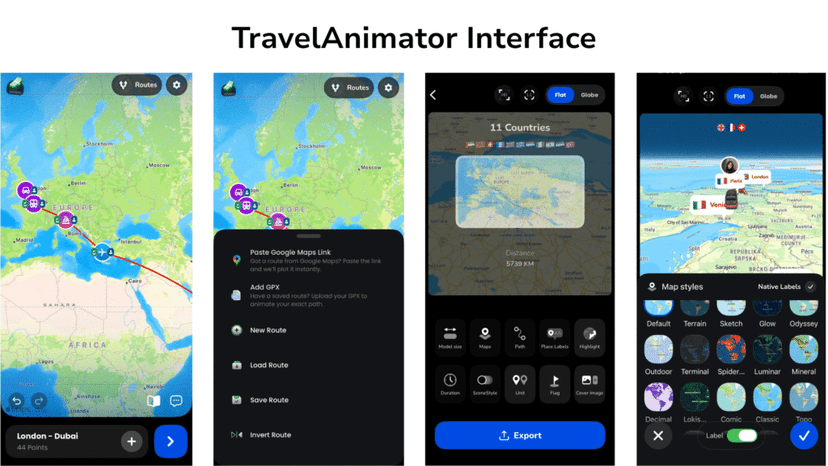
- Lifetime Free – TravelAnimator doesn’t limit the number of videos you can create. Whether you make one animation a month or several a week, the free plan remains available with no usage cap.
- Designed for Mobile Users – TravelAnimator is available as a user-friendly app for both Android and iOS devices. This makes it convenient for travellers who prefer creating and sharing animations directly from their phones while on the go.
- Free GPX File Import – If you record your hikes, cycling trips, or road journeys using GPS apps, you can import GPX files into TravelAnimator without upgrading. In Mult.dev, GPX import is only available in the paid plan.
- Multiple Transport Models Free – The free version of TravelAnimator includes car, biplane, bus, train and boat models in multiple colour options. Mult.dev’s free plan only supports air routing. If your journey involved a road trip, ferry crossing, or overland train route, you can represent that accurately in TravelAnimator without paying.
- Large Collection of Travel Models – TravelAnimator offers more than 300 travel models across its free and Pro plans, including cars, planes, bikes, buses, ships, scooters, seasonal vehicles, and region-specific models. You can even use different models for different parts of the same journey.
- 2D and 3D Map Views – Users can switch between 2D maps and 3D views to create different visual styles. The 3D option is particularly useful for showcasing long-distance and international trips.
- Photos, Texts and Elements on Routes – TravelAnimator allows users to add photos, labels and elements showing different destinations to stops along the route, making travel videos more informative and personalized. This helps turn simple route animations into engaging travel stories.
Mult.dev Studio
Place it after “What Makes Mult.dev Better?” and before “Which Tool Is Right for You?”
What Is Mult.dev Studio, and How Is It Different?
Mult.dev Studio is [CONFIRM: one-line definition, e.g. the editor or workspace it sits in]. The standard Mult.dev flow is built for speed: add your stops, pick a style, export. Studio is aimed at [CONFIRM: who it’s for].
Here is how it differs from the standard Mult.dev experience:
- What it adds – [CONFIRM: key capabilities beyond the standard editor]
- How you access it – [CONFIRM: web only, app, or included in a Pro pack, and whether it costs extra]
- Who it suits – [CONFIRM: e.g. teams, professional or repeat users]
How this compares with TravelAnimator: TravelAnimator doesn’t split its editor into a separate product. The same mobile editor, with route building, 300+ models, photos, labels and GPX import, is what you use on both the free and Pro plans. Pro changes the output (4K export, no watermark, the full model and map library, unlimited saved routes), not which tools you can reach.
What Makes Mult.dev Better?
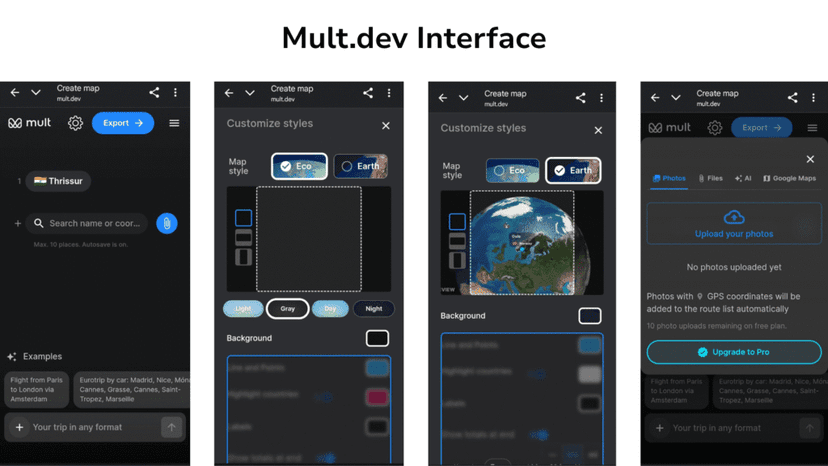
- Works in a Web Browser – Mult.dev can be accessed directly from a desktop or laptop browser, which some users may find more convenient when creating videos for presentations, YouTube content, or other projects. TravelAnimator is currently available only as a mobile app for Android and iOS devices.
- Simple Interface for Quick Videos – Mult.dev focuses on a simplified workflow. If you only need a basic animation between two locations, you can enter the destinations, choose a style, and export the video in just a few steps. TravelAnimator offers more customization options, which may require a little more setup time to get the perfect video.
- Realistic Road Routing in the Pro Plan – Mult.dev’s paid version can follow actual roads and railways using mapping data, making driving and train routes appear more accurate. TravelAnimator also offers real route options in its free plan, allowing users to choose realistic paths between locations without upgrading.
- Flexible One-Time Purchases – In addition to subscriptions, Mult.dev offers credit packs for users who only need premium features occasionally. This can be useful for people who create travel animations infrequently. TravelAnimator Pro is available through weekly, monthly, yearly, and lifetime plans.
Which Tool Is Right for You?
Choose TravelAnimator if you:
- Create travel content regularly, and don’t want a video limit
- Track your routes with a GPS app, and want to animate them accurately
- Work primarily on your phone and need a mobile-friendly experience
- Want multiple transport modes without paying
- Are a casual traveller, social media creator, travel vlogger, or outdoor enthusiast
Choose Mult.dev if you:
- Create occasional, polished map videos on a laptop or desktop
- Only need a handful of high-quality videos and don’t mind credit packs
- Want a browser-based tool with no app to install
- Need professional real-road routing for presentations or YouTube content
Both tools make good-looking animated map videos quickly and without editing skills. The difference is how often you’ll use them and whether the free tier’s constraints fit your actual workflow.
How to Get Started with Travel Animator
- Download the TravelAnimator App from the App Store or Play Store.
- Open it and start creating your animation by selecting the start point and end point locations from Add Locations at the bottom of the screen.
- Use the + icon to add more destinations, and drag them to the correct order. There is no limit to the number of locations in a single animation video.
- Long-press on each point on the line to open the model menu. Choose the appropriate model from 300+ options for each point.
- You can add images, text, or elements to each point by long-pressing the point and selecting media. It helps to make your animation more personal.
- You can also add an avatar and enable real routes from the long-press options for free.
- Preview your animation by tapping the blue icon located at the bottom-right corner of the screen. This lets you see how your route plays out before finalizing the video.
- After checking the preview, customize your video by changing the ratio, model size, path customization, place label customization, highlight settings, duration settings, scene style selection, unit selection, flag settings, cover image settings, etc.
- If you have a pro version, you can enable the 3D maps and select the best map from the 30+ maps collection. Also, you can export in 4K quality.
- Export the video and share it directly on different platforms.
TravelAnimator Free vs Pro — What's the Difference?
| Feature | TravelAnimator Free | TravelAnimator Pro |
|---|---|---|
| Video exports | Unlimited | Unlimited |
| Export quality | HD with watermark | 4K without watermark |
| Travel models | 10+ basic models + 1 free Pro model | 300+ models, including premium, seasonal, and Indian models |
| Map styles | Default 2D map | Full 2D and 3D map library with 30+ maps |
| Save routes | 1 route at a time | Unlimited saved routes |
| Watermark | Yes | No. Customization also available |
Frequently Asked Questions
Is TravelAnimator completely free?
No, the core features, including unlimited video creation, HD export, GPX import, Google Maps import, multiple transport modes, photo and label, and element adding, are all free. The watermark is removed, and 4K quality is unlocked in the Pro plan.
Does TravelAnimator have a desktop or web version?
No, TravelAnimator is a mobile app for iOS and Android only. If you need to create map animations in a browser on a laptop, Mult.dev or AnimateMyTravel is a better fit.
What is Mult.dev's free video limit?
Mult.dev’s free plan allows 5 videos total (not per month, total lifetime credits). After that, you need to purchase a credit pack to create more.
Can I export in HD for free on TravelAnimator?
Yes, TravelAnimator’s free plan exports in HD quality. The video will include a watermark; upgrading to Pro removes it and unlocks 4K.
Which is better for Instagram Reels and TikTok?
TravelAnimator’s mobile-friendly design makes it faster to go from route to Reel. If you’re already on your phone, you can share directly from the app. Mult.dev also supports 9:16 vertical export and works well for Reels if you’re creating on a desktop.
Can I import a GPX file from Strava or Garmin into TravelAnimator for free?
Yes, TravelAnimator’s free plan can import the GPX file directly. On Mult.dev, GPX import requires a Pro credit pack.
Disclosure: This article was written by the team of TravelAnimator. We compared both tools using identical routes and settings and have done our best to present an honest comparison so readers can decide which platform best fits their needs.
Are You Looking for a Free Alternative?
TravelAnimator offers animated map videos with its multiple features for more customization. Its user-friendly interface lets everyone, including casual users, travellers, businesses, and travel agencies, use the app in a few minutes.
TravelAnimator is part of a growing ecosystem of animated map tools. If you want to compare other options before deciding, our full comparison of free travel animation apps covers all the major alternatives, including AvoMap, PictraMap, Multdev and TravelBoast.
TravelAnimator is free forever. It is rated 4.6/5★ on the App Store and 4.3/5★ on Google Play Store by 10,00000+ travellers. Download free on the App Store or Play Store and explore the free TravelAnimator without a video limit.