The Best Free Alternative to TravelBoast in 2026
 Jaseel S10 min read
In this article 9 sections
If you’ve been using TravelBoast to create animated travel route videos and you’re looking for a free alternative, here is a TravelBoast alternative. Many travellers and content creators enjoy using TravelBoast to create animated route videos, but some users explore other options due to ads, more features in other apps, or limitations in the free version.
TravelAnimator is one of the most popular alternatives available for both iOS and Android devices. It offers many of the same travel animation features as TravelBoast, along with additional tools such as 3D maps, highlighting important areas, cover image, and customizing place labels.
In this guide, we’ll compare TravelBoast and TravelAnimator, explore what is included in the free plans, and help you decide which app is the better choice for creating your travel videos.
Publisher disclosure: This guide is published by the team behind Travel Animator. It compares our product with alternatives and is not an independent review. Availability and purchase options can vary by app version, device and region.
What Is TravelBoast?
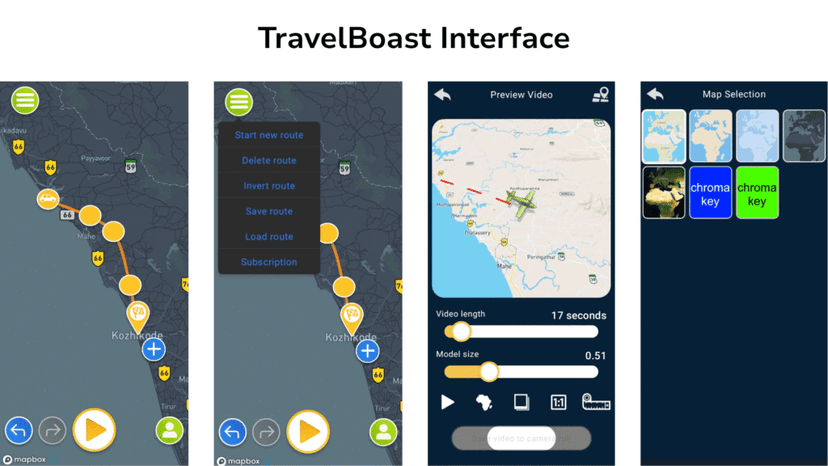
TravelBoast (developed by Urobots GmbH) is one of the original travel animation apps. Over 20 million iOS and Android users worldwide have used it since its release, and it has been the most popular mobile travel animation app in more than 30 countries. Its core feature is simply to pick a transport vehicle, draw a route on a map, press play, and you get a short animated video ready to post on Instagram or TikTok.
It’s a straightforward tool built for casual travellers and social media sharing, with 160–200 vehicle models and support for both iOS and Android.
What Is TravelAnimator?
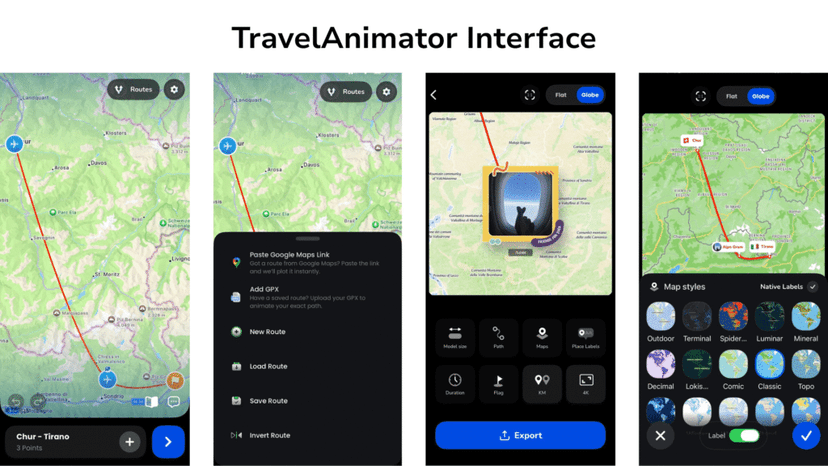
TravelAnimator (built by Lascade, a 40+ person app studio) is a mobile-first travel animation app available on iOS and Android. It’s rated 4.6 out of 5 on the App Store and 4.3 on the Play Store, with 3,000,000+ downloads and a growing user base that includes casual travellers, content creators, travel agencies, and students.
Apps like TravelBoast and TravelAnimator offers a free plan to create, export, and share animated travel videos, with a watermark until you upgrade. The TravelAnimator free plan includes 10+ travel models, 80+ video elements, multiple photos per stop, and HD export. The Pro plan unlocks 300+ models, 30+ map styles, including 3D across iOS and Android, 4K export, custom logo, chromakey backgrounds, and watermark-free exports.
Recent additions to the TravelAnimator app include 3D elements you can place along the route (buildings, mountains, trees), cover images, place labels & path customization, as well as avatar personalization with your own photo above the vehicle.
TravelAnimator vs TravelBoast: Full Feature Comparison
| Feature | TravelAnimator | TravelBoast |
|---|---|---|
| Free core video creation | ✅ (free plan) | ✅ (free plan, with ads) |
| 3D maps | 30+ 2D & 3D styles | 20 maps only on Android; 3D maps available on iOS only |
| 4K Video Export | ✅ (Pro plan) | High-quality export in the Pro plan |
| Undo, and redo | ✅ | ✅ |
| Upload GPX file | ✅ | ✅ |
| Import Google Maps link | ✅ | ✅ |
| Travel Models / Vehicles | 300+ models (10+ free, 300+ Pro) | 180–200 models (8 free) |
| Route line customization | Colour, thickness, style | Limited |
| Add photos to route points | Multiple photos per stop with captions & more customizations | Single photo per stop with caption and emojis |
| Video effects/elements | 80+ free elements | Premium effects (paid) |
| Chromakey background | ✅ (premium maps) | ✅ (free) |
| Custom logo/branding | ✅ (Pro plan) | ❌ |
| Max video length | Up to 81 seconds | Up to 74 seconds |
| Social media sharing | ✅ iOS & Android | ✅ iOS & Android |
| Platform | iOS & Android (mobile) | iOS & Android (mobile) |
| Monthly subscription (Pro) | ✅ Optional — unlocks more models, 3D maps, 4K export, watermark-free videos | ✅ Optional — unlocks models, effects, 3D maps (iOS only), removes ads & watermark |
Why Travellers Are Choosing TravelAnimator as Their Free TravelBoast Alternative
Here’s what specifically makes TravelAnimator stand out for users who’ve come from TravelBoast.
- The Free Plan Is Actually Free
Both apps add a watermark to videos made with the free plan. However, TravelAnimator offers more free features, including 10+ travel models, 80+ video elements, multiple photos and captions per stop, route customization, HD export, and no ads.
TravelBoast’s free plan is more limited and includes ads. The main advantage of TravelBoast is that it offers a free green-screen (chroma key) background, whereas this feature is only available in TravelAnimator’s premium maps.
- 3D Maps on Both iOS and Android
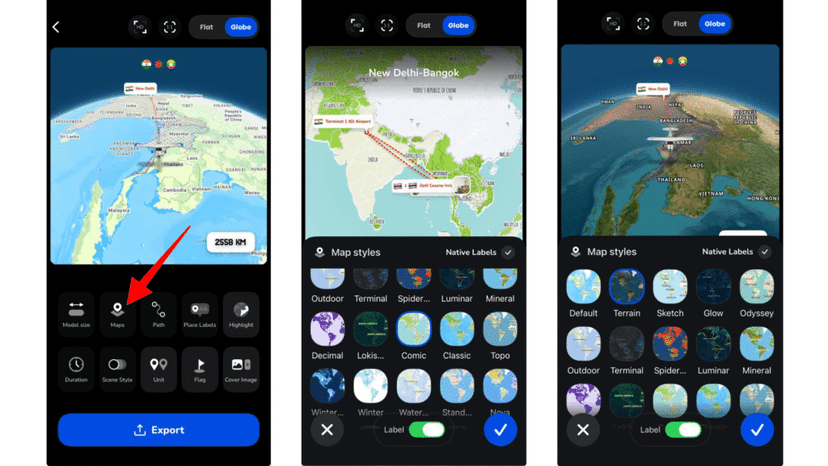
TravelAnimator offers 30+ map styles, including 2D and 3D options such as satellite views, winter themes, blueprint styles, and globe projections, available on both iOS and Android with the Pro plan.
TravelBoast offers 3D maps, but only on iOS. Android users on TravelBoast are limited to 2D maps regardless of their subscription. If you’re on Android and want 3D map animations, TravelAnimator is the only option.
- Multiple Photos Per Stop
TravelAnimator lets you add multiple photos with captions at a single destination point. This lets you document different moments, meals, or sights at the same location within one animation, a storytelling depth that TravelBoast doesn’t match. TravelBoast allows only one photo per stop, with a caption and emojis.
- 80+ Free Video Elements
TravelAnimator includes 80+ elements such as buildings, mountains, and tourist attractions that you can add to your animation at no cost, bringing personality to the video. TravelBoast’s effects and elements are locked behind its paid subscription, meaning the free version gives you a much more basic output.
- Route Line Customization
In TravelAnimator, you can change the route line’s colour, thickness, and style to match your video’s visual theme. This matters when you’re posting to Instagram Reels or YouTube Shorts, a customized route line looks more professional than the default. TravelBoast offers limited control over the appearance of the route line.
- More Choice from Various Models
TravelAnimator’s free plan includes 10+ models. Its Pro plan gives access to 300+ models, including regional options (Indian vehicles, seasonal models like Christmas-themed), real-world vehicle types, and multi-colour variants. TravelBoast tops out at 160–200 different models total across all plans.
Who Should Use Which App?
| You are... | Best choice... |
|---|---|
| A casual traveller who wants quick, simple videos for Instagram without worrying about settings | Either app works. Neither is free of watermarks without a subscription. TravelAnimator has no ads on the free plan; TravelBoast does. |
| A content creator who wants 3D maps and 4K export for YouTube or Reels | TravelAnimator (Pro plan) – 3D maps on both iOS and Android. |
| An Android user who wants 3D map animations | TravelAnimator – TravelBoast's 3D maps are iOS only. |
| Someone who has already planned a trip in Google Maps | Both TravelAnimator & TravelBoast – paste the link and animate in seconds. |
| Someone who wants to add multiple photos and captions at each stop | TravelAnimator – supports multiple photos per stop; TravelBoast allows only one. |
| Someone who wants free chromakey / green screen background | TravelBoast – chromakey is free; TravelAnimator requires Pro. |
| A travel agency creating professional route presentations using its own logo | TravelAnimator Pro – customized logo, 3D maps on both platforms, route line control, and multiple photos per stop. |
| Someone who doesn't want ads on the free plan | TravelAnimator – no ads; TravelBoast shows ads on the free plan. |
Download the TravelAnimator app for free from the App Store (iOS) or Play Store (Android).
Download the TravelBoast app for free from the App Store (iOS) or Play Store (Android).
What Does TravelAnimator's Free Plan Include?
This is the question most people have before downloading. Here’s a clear breakdown:
Free plan includes:
- 10+ travel models in multiple colours
- Basic map style
- HD video export (watermark included, removed with Pro)
- Multiple destinations per video
- Multiple photos and captions per destination point
- Avatar with your photo
- Real routes, GPX, Google Map link import
- 80+ free video elements
- Route line color, thickness, and style control
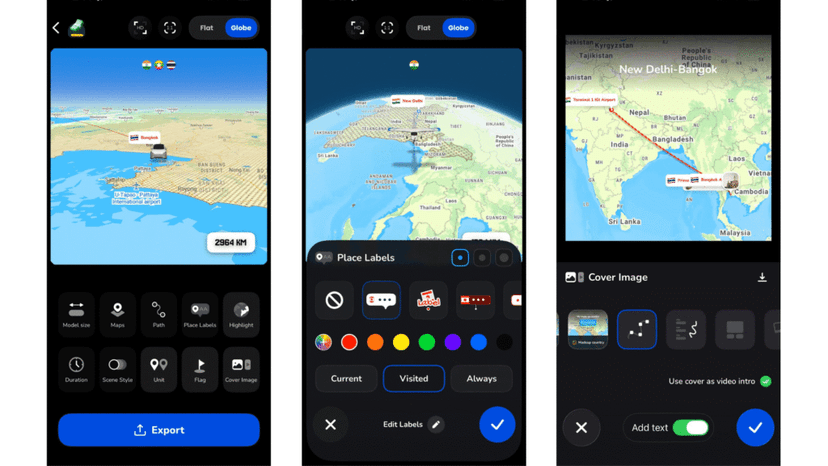
- Place label Customization
- No ads
- Cover Image setup
- No subscription required
- No time limit on the free plan
Pro plan unlocks: 300+ models, 30+ map styles including 3D across iOS and Android, 4K export, chromakey/premium map backgrounds, watermark-free exports, and additional premium logo customization. Weekly, monthly, and annual plans are available.
How to Get Started with TravelAnimator
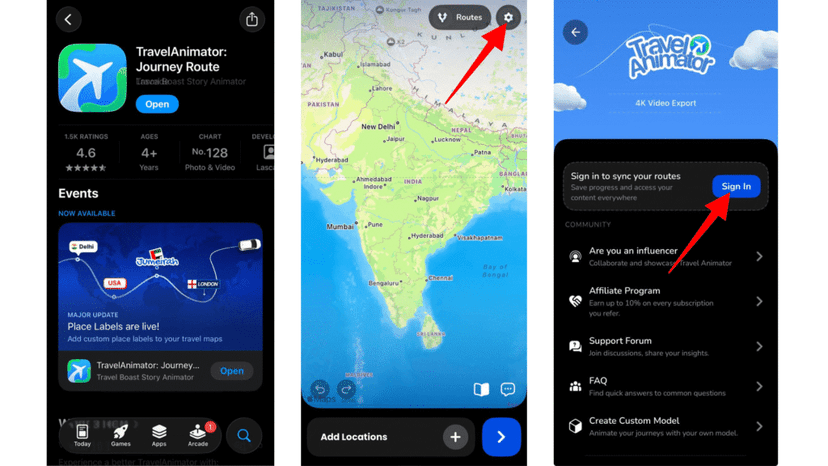
1. Download TravelAnimator and sign up for an account. Sign in if you already have an account.
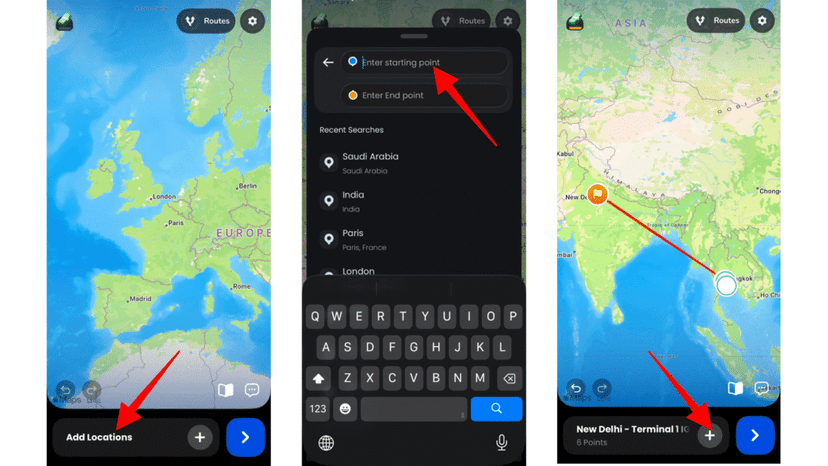
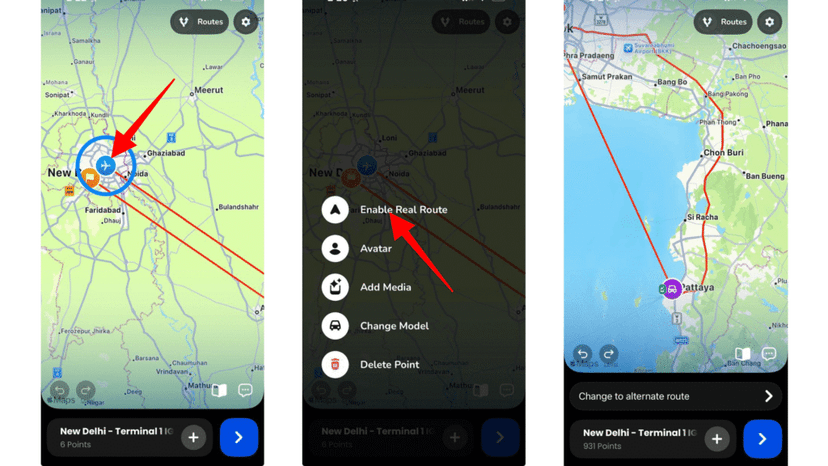
2. Open the app and search for each destination. Tap the “+” icon to add destinations, and tap the route to add stops.
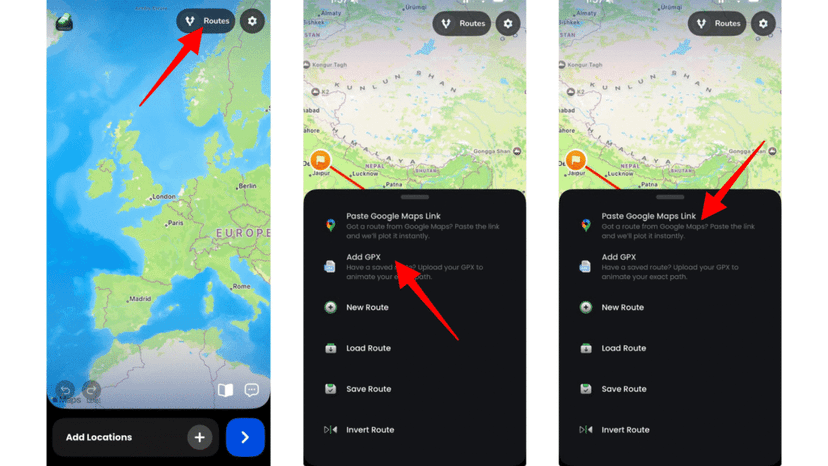
3. You can either upload the GPX file or paste the Google Maps link to your routes.
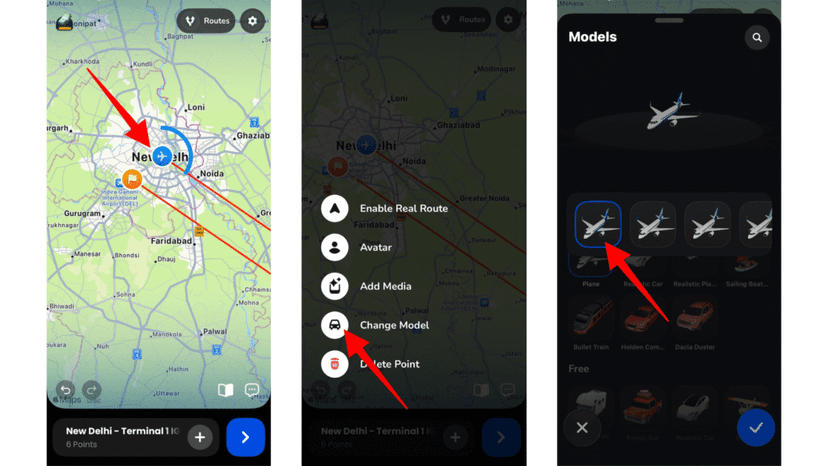
4. Long-press the destination points, then add suitable travel models from the list.
5. Add and customize images, text and elements for different destinations and customize each based on your animation theme.
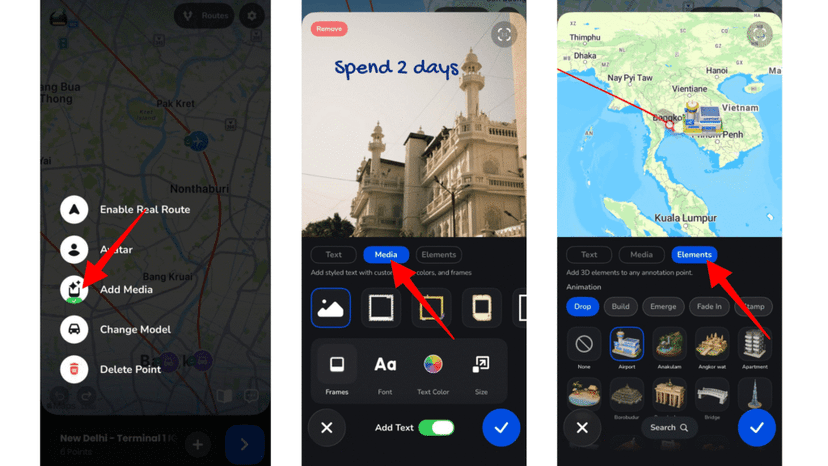
6. Enable real routes when adding destinations manually, if needed.
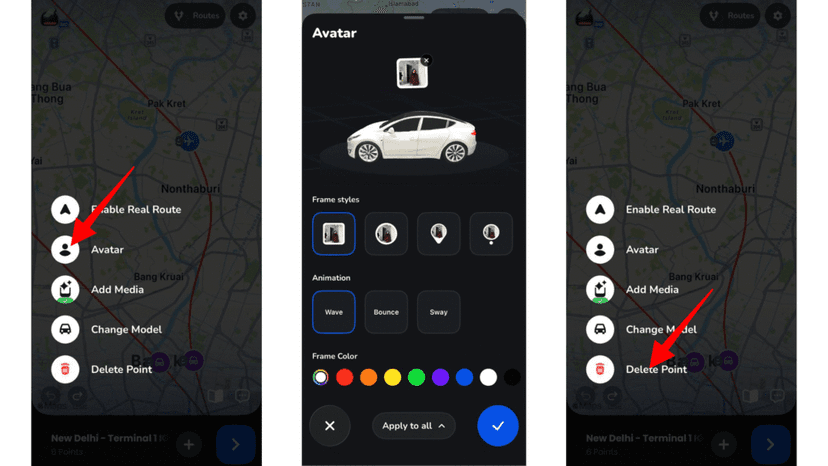
7. You can add your Avatar and delete points by long-pressing the stop.
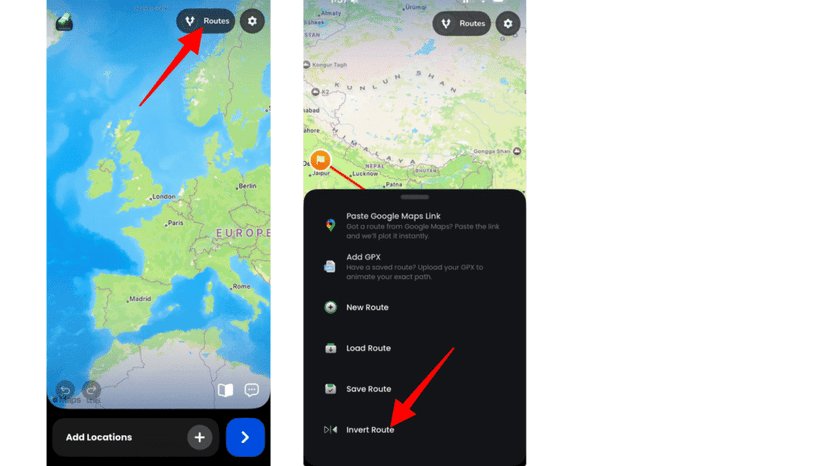
8. If needed, reverse routes in your animation from the route menu.
9. Preview the video to see how your animation looks.
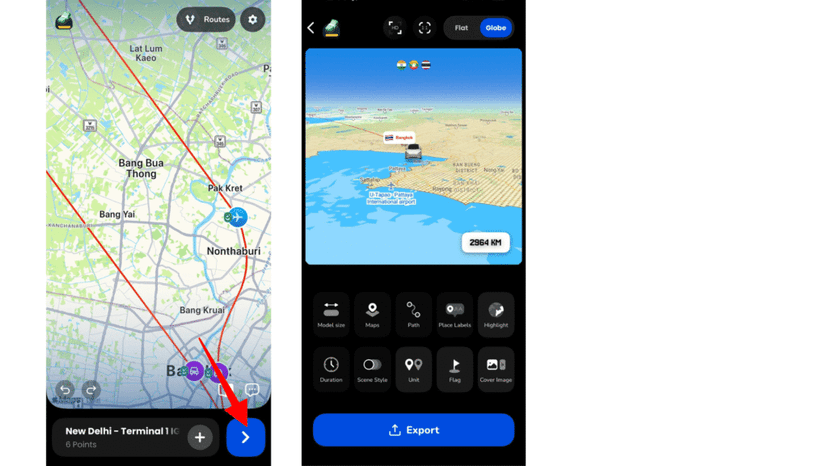
10. If you have a premium version, choose the best map style from the Map style menu to make the video more engaging.
11. Customize all features, including ratio, flags, unit, model size, video duration, place labels, and add a cover image.
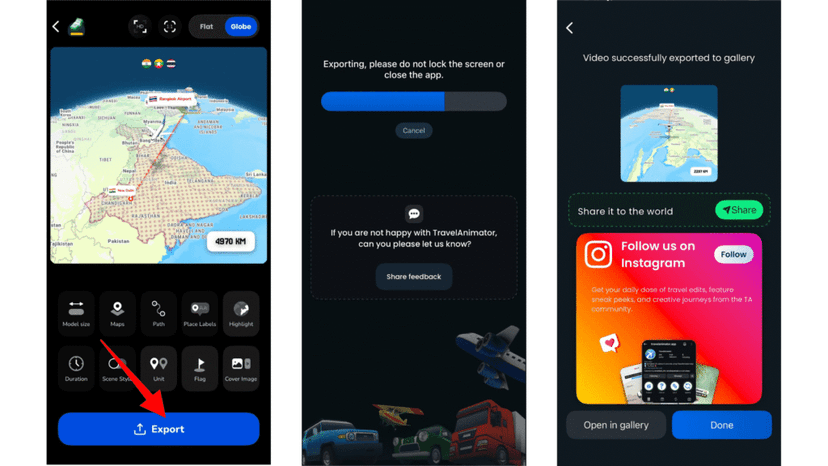
12. Export video directly to the device in HD quality and share it on social media.
Frequently Asked Questions
Is TravelAnimator completely free?
The core video creation experience, such as adding destinations, choosing from 10+ travel models, adding multiple photos per stop, and using 80+ video elements, is free with no time limit and no subscription required. Free plan exports include a watermark. Upgrading to Pro removes the watermark and unlocks 300+ models, 3D map styles, 4K export, and chromakey backgrounds.
Does TravelBoast have a free plan?
Yes, TravelBoast is free to download and use. The free version lets you create animated travel route videos, choose from a selection of vehicle models, and share directly to social media. It includes ads during use and adds a watermark to exported videos – a paid subscription removes both. One thing worth noting is that TravelBoast’s free plan includes chromakey background, a useful feature for content creators who want a clean or custom backdrop.
Can I use TravelAnimator on a PC or a web browser?
TravelAnimator is a native mobile app for iOS and Android. It is not currently available as a web or desktop tool. If you need a browser-based travel animation tool, alternatives like Mult.dev or AnimateMyTravel work directly in your browser on PC and Mac.
Does TravelAnimator support undo and redo?
Yes. TravelAnimator supports undo and redo steps within an active editing session. You can also delete individual route segments or clear the entire route in TravelAnimator.
Can I upload a GPX file to TravelAnimator?
Yes. You can upload GPX files directly from your device to create an animation of your exact tracked route, useful if you’ve recorded a hiking trail, cycling route, road trip, or run with a GPS device or app like Strava.
Which app is better for travel agency or business use?
TravelAnimator is the stronger choice for business and agency use, primarily because of 30+ various 3D map styles, route line customization, the ability to add photos and labels at each destination, and 4K export for professional presentations. They can also add their custom logo to the animation.
Ready to Try the Free TravelBoast Alternative?
TravelAnimator is free to download and you can create your first animated travel video in under 5 minutes. No subscription needed to start.
Download the TravelBoast Alternative, i.e., TravelAnimator app, free on the App Store (iOS) or Play Store (Android).