Nova Map in Travel Animator
 Jaseel S6 min read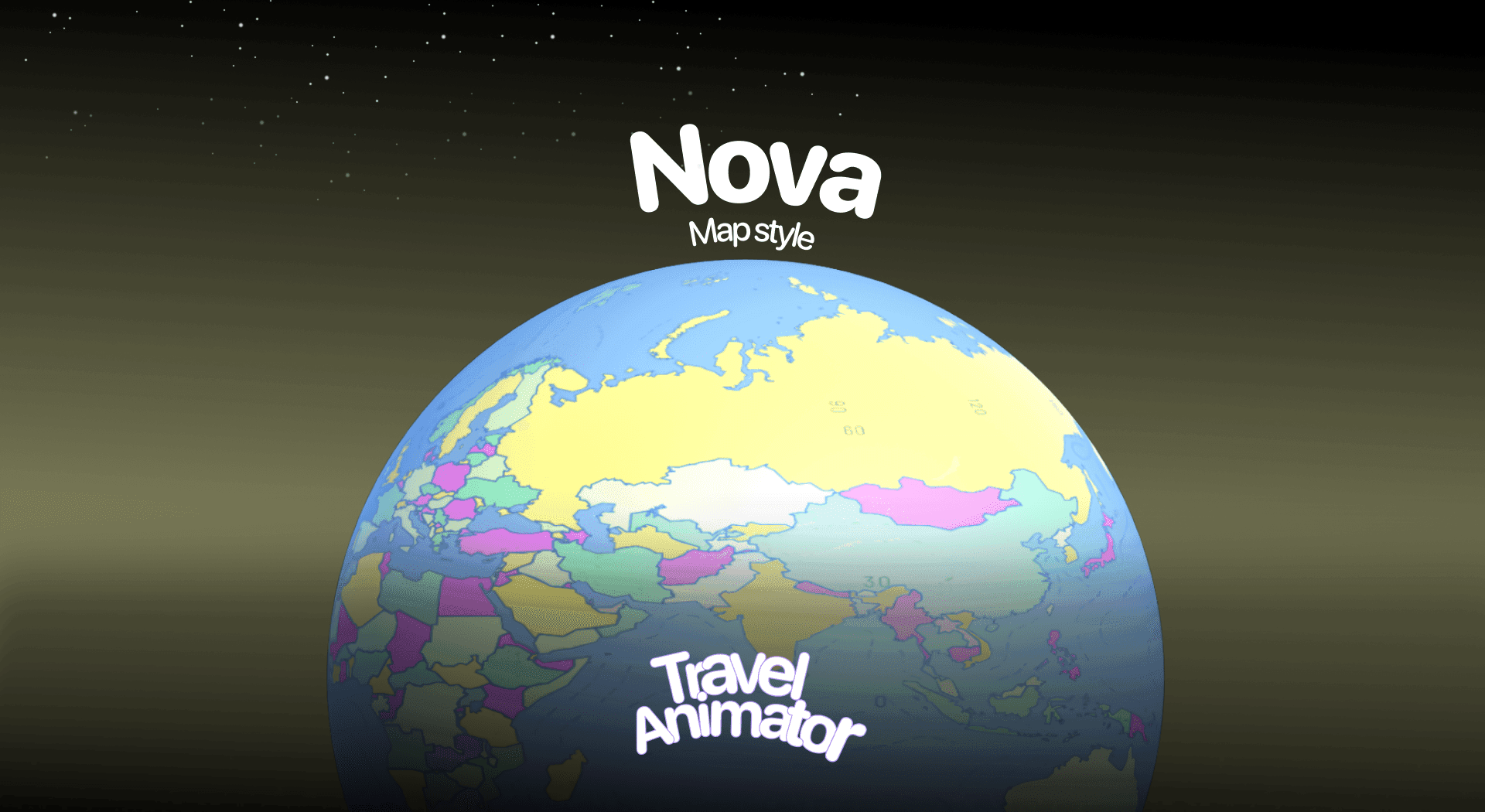
In this article 8 sections
The Nova Map style in Travel Animator is designed for creators who want their travel animations to look bright, colorful, and full of energy. With its bold color palette and clear boundaries, this map style brings a lively, eye-catching feel that makes journeys look more exciting.
Whether you’re making travel vlogs, study presentations, or fun family trip videos, Nova adds a unique splash of vibrancy that stands out.
In this blog, you will explore the new map style Nova, its use cases, and how to use it in your travel animation.
If you want the tech feel rather than the glow, see the Terminal map style.
What Is the Nova Map Style in Travel Animator?
The Nova Map style is one of the newly released, visually dynamic themes available in Travel Animator. Nova uses bright, contrasting shades to highlight countries, regions, and landscapes. This makes it easier for viewers to differentiate areas, while also giving the map a fun and dynamic personality.
The Nova style feels almost playful, making it a great choice when you want your video to feel more pleasant and engaging rather than formal or cinematic. For travel enthusiasts, it highlights the diversity of places visited. For students, it makes geographical boundaries clearer and more memorable. And for casual users, it makes maps look less severe and more fun to watch.
Is the Nova Map Style Free or Premium?
The Nova Map style is available for free for 30 days from the release in Travel Animator. This gives every user the chance to test and explore it at no cost.
After the free trial, it will move into premium access. You need to upgrade to Travel Animator Pro to get the Nova Map style. Utilize other premium features with Nova Map in your travel video to get maximum output.
How to Use the Nova Map Style in Your Animation
- Open the Travel Animator app on your device.
- Sign in and upgrade to Travel Animator Pro.
- Choose your routes or travel paths.
- Add suitable models, images, and labels on the routes.
- Go to the Preview Video and then tap on the Maps to select the map style.
- Scroll through the available styles and choose Nova Map.
- Toggle on Place Labels if you want the location names to appear. This helps in storytelling, mainly when you’re covering multiple destinations.
- Tap Select to apply this map. Preview your animation in either 2D or 3D mode.
- Export your animation and share it on YouTube, social media, or in a presentation.
Getting the Route to Stand Out on a Colourful Map
Nova already does a lot of colouring for you. Countries and regions come in bold, contrasting shades, so the main risk is your route line getting lost among them. A few adjustments make a big difference.
- Pick a line colour that isn’t in the map. Play the preview and notice which shades show up along your route, then choose a path colour that doesn’t match any of them. White is often a safe bet on a map this busy.
- Go a step thicker. A thin line that works on a plain map can disappear here. Medium or Thick in the Path Colour settings holds up better, especially on a phone.
- Go easy on highlights. Nova already separates regions by colour. Adding a filled highlight on top can make the map feel crowded, so use it only for the one area that matters most, with a pattern or border instead of a solid fill.
- Keep labels selective. On a multi-country trip, place labels help viewers follow along. For a single-city loop, the map is usually clear enough without them.
Who Can Use the Nova Map Style in Travel Animator?
- Travel Vloggers narrate their adventures across countries while viewers see each region clearly highlighted in vibrant shades. Nova makes your journey visually appealing and easy to follow.
- For classroom presentations, Nova simplifies geography lessons for teachers & students. The bold color palette makes it easier for students to identify and differentiate between regions.
- Businesses that need to showcase global reach, logistics routes, or expansion strategies can use Nova to create engaging map animations without being too formal.
- Nova Map is ideal for YouTube, Instagram, or TikTok creators seeking eye-catching visuals to capture attention quickly.
Nova or Another Style? A Quick Comparison
Nova sits in a group of bold, modern styles, and they each lean a different way.
- Nova is bright and playful, with clear, colourful boundaries. Best when you want energy and the regions themselves are part of the story, like a Europe rail trip that crosses six countries.
- Luminar uses glowing outlines on a deep ocean-blue background. It feels calmer and more cinematic, and suits long-haul flights and night journeys.
- Decimal has a clean digital look, a good match for data-driven or business presentations.
- Terminal goes full tech, with neon lines on a dark background.
- Bubble is the opposite of all of these, with natural greens, browns and blues for landscape-focused trips.
If a class project needs regions that are easy to tell apart, Nova is usually the clearest of the group. Our guide to school project travel maps has more on building those videos.
Is Nova the Right Choice for Your Travel Videos?
Nova is an excellent choice if you’re looking for a map style that combines fun, energy, and vibrancy. Its bright colors make geographical boundaries easy to distinguish, while its playful style adds energy to your videos and presentations.
Nova ensures your audience enjoys the ride as much as you did, whether it’s for YouTube, social media, or classroom presentations. With a 30-day free trial, you can test it out risk-free and see how it enhances your animation video. In the end, if your goal is to make your travel animations stand out with personality and visual impact, then upgrade to Travel Animator Pro to utilize all premium features. Download TravelAnimator Now from the Play Store or App Store.
Frequently Asked Questions
What Is the Nova Map Style in Travel Animator?
The Nova Map style is one of the , visually dynamic themes available in Travel Animator. Nova uses bright, contrasting shades to highlight countries, regions, and landscapes.
Is the Nova Map Style Free or Premium?
The article describes a 30-day introductory offer measured from the map’s release date, not a fresh trial for each user. Check the map’s current availability and access requirement in the app before using it.
Who Can Use the Nova Map Style in Travel Animator?
Travel Vloggers narrate their adventures across countries while viewers see each region clearly highlighted in vibrant shades. Nova makes your journey visually appealing and easy to follow.
What route line colour works best on the Nova map?
Choose a colour that doesn’t appear in the regions your route crosses. Because Nova uses bright, contrasting shades for countries and regions, a white line or a colour that’s absent from that part of the map tends to stand out most. Set the thickness to Medium or Thick in Path Colour, then preview the whole route, since the background colours change as the journey moves.
Can I use the Nova map in both 2D and 3D?
Yes. After selecting Nova from the map styles on the preview screen, you can play your animation in either 2D or 3D mode. The flat 2D view makes regional boundaries easiest to read, which helps for presentations, while the 3D globe works well for long routes that cross continents. Try both before exporting.