Treasure Map in Travel Animator
 Jaseel S6 min read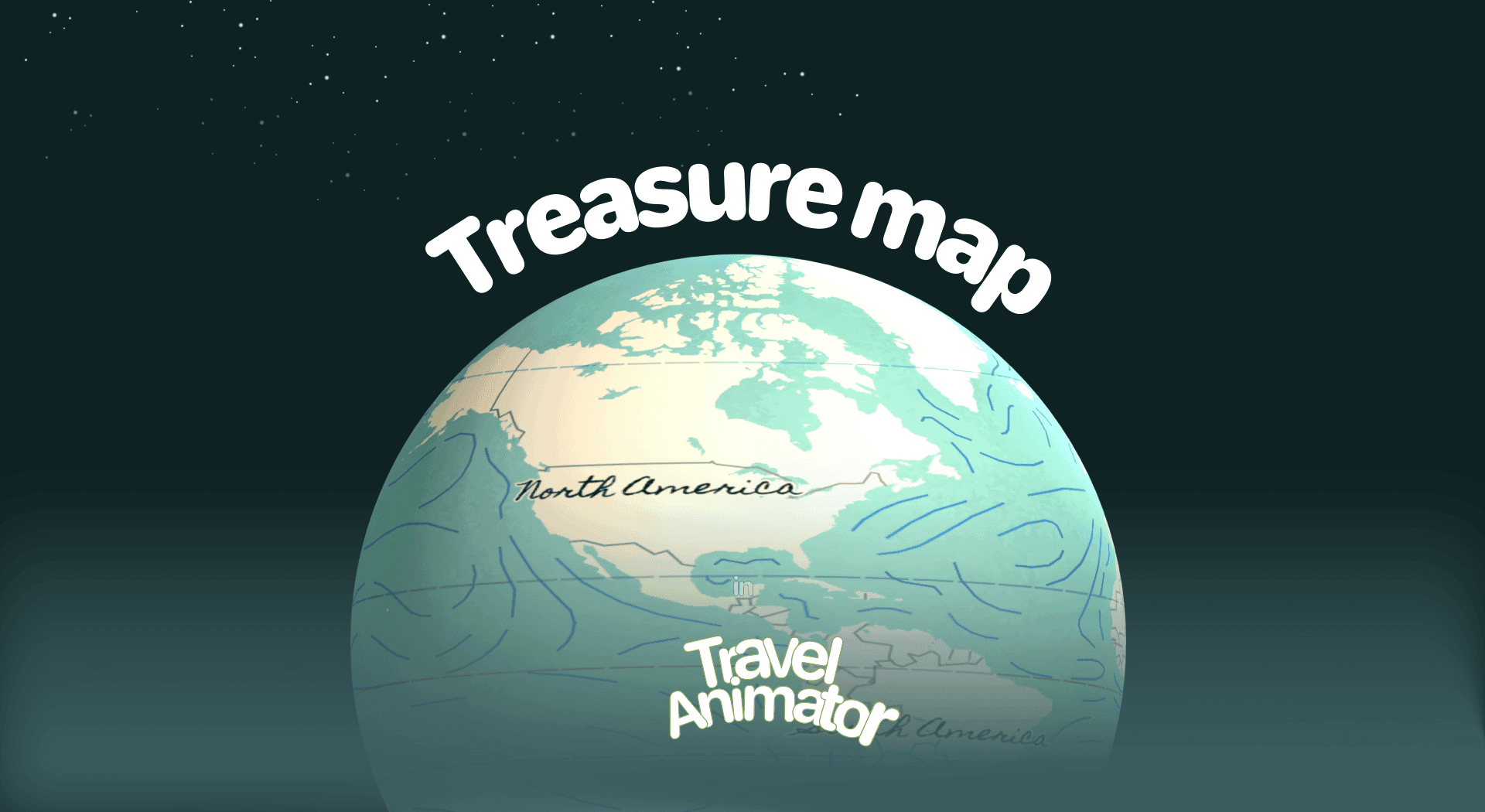
In this article 9 sections
Treasure Map is a newly released map style that adds adventure and storytelling to your travel animations by transforming simple route animation into an exciting one.
Imagine showcasing your travel vlog where the path is hidden like a treasure hunt, with every stop feeling like a hidden destination waiting to be discovered. You are searching for a suitable map that makes the animation not just informative, but fun, engaging, and memorable.
This guide explains the new Treasure Map Style in Travel Animator, its use cases, and steps to use it.
For a fantasy world rather than a treasure hunt, see Loki’s World.
What Is the Treasure Map Style in a Travel Animator?
The Treasure Map style is designed as an ancient adventure book that gives your animation a classic treasure hunting tale with its soft blue sea, land textures, and handwritten texts.
This style is designed to transport your audience into a world of exploration instantly, whether you’re creating a family trip, an educational story, or adding uniqueness to your content.
The Pirates map is its closest sibling, with a vintage seafaring finish.
Is the Treasure Map Style Free or Premium?
Treasure Map is available for free for 30 days from the day of release. However, other premium features are not available to enhance your animation.
Treasure Map Style in Travel Animator is available in the app’s premium version. Upgrade to the Travel Animator App to explore all premium features with the Treasure Map to get an attractive output.
How to Use the Treasure Map Style in Your Project
- Open the Travel Animator app and sign in using an email address.
- Upgrade the app to use the Treasure Map style in your animation video.
- Add destinations and stops.
- Select the suitable travel models, images, and labels. You can choose different models, photos, and labels for each destination and stop.
- Preview the video to see the Map option.
- Choose the Treasure Map from the map styles.
- Add and adjust other features, such as ratio, model size, and video duration.
- Export the video in HD/4K quality and share it on your social media.
Some Use Cases of the Treasure Map Style?
- Content creators and vloggers can create travel vlogs and storytelling videos that make their adventures feel like an adventure tale.
- Teachers can use the Treasure Map style in lessons to make history, geography, or literature more engaging.
- Families can create personal trips or their kids’ projects with Storybook Touch.
- Travel Agencies can create videos to showcase when promoting tours, cruises, or cultural experiences.
Getting the Most Out of the Treasure Look
The Treasure Map already has a lot going on, with a soft blue sea, textured land and handwritten place names. What you add on top should support it, not fight it.
- Choose a route line that contrasts with the sea. A warm red or deep brown reads well, while a pale blue line can sink into the water. You can change the route line color, thickness and style from the preview screen.
- Let the handwriting breathe. If your own place labels crowd the map’s lettering, shorten them, or switch off the background map labels in the map menu and keep yours.
- Match the model to the story. A ship for an island-hopping trip or a hiker for a coastal trail fits a treasure hunt far better than a city bus.
- Give each find a moment. Adding a photo or a line of text at a stop slows the animation there, creating a reading pause so viewers can take it in.
For a kids’ project like “Our Summer Treasure Hunt” from home to a beach and an island, a label such as “X marks the spot” at the final stop does more for the theme than any extra effect.
Treasure, Pirates or Ancient: Which Vintage Style Fits
Travel Animator has a few old-world map styles, and they’re easy to mix up.
- Treasure Map keeps a soft blue sea with textured land and handwritten text. It feels playful, so it suits family trips, school projects and adventure reels.
- Pirates goes for warm antique brown with old-fashioned lettering, closer to a seafaring chart.
- Ancient uses warm browns, muted yellows and textured paper, which suits heritage tours and history lessons that should feel centuries old.
If you can’t decide, preview the same route in each one. Map styles are picked on the preview screen after your stops, models and labels are set, so trying three styles takes a minute.
If Treasure Map Isn't in Your Map List
Map styles live on the preview screen, not in the route editor, so tap Preview first and then open the map menu. If Treasure still isn’t there, update the app, since missing features and maps are often down to an older version. If you can see it but can’t apply it, check your plan. Outside the 30-day launch window, the style is part of Pro.
Is the Treasure Map Style Worth Trying?
Treasure Map style is a creative way to add depth and excitement to your travel animations. This route transforms the ordinary into adventurous stories, whether you’re creating content for YouTube, a client presentation, or personal memories. If you need your videos to stand out and leave a lasting impression, Treasure Map is worth exploring.
Upgrade Travel Animator and utilize every feature with Treasure Map for maximum output.
Frequently Asked Questions
What Is the Treasure Map Style in a Travel Animator?
The Treasure Map style is designed as an ancient adventure book that gives your animation a classic treasure hunting tale with its soft blue sea, land textures, and handwritten texts. This style is designed to transport your audience into a world of exploration instantly, whether you’re creating a family trip, an educational story, or adding uniqueness to your content.
Is the Treasure Map Style Free or Premium?
The article describes a 30-day introductory offer measured from the map’s release date, not a fresh trial for each user. Check the map’s current availability and access requirement in the app before using it.
Some Use Cases of the Treasure Map Style?
Content creators and vloggers can create travel vlogs and storytelling videos that make their adventures feel like an adventure tale. Teachers can use the Treasure Map style in lessons to make history, geography, or literature more engaging.
Why can't I find the Treasure Map style in Travel Animator?
Map styles appear on the preview screen, so build your route, tap Preview and open the map menu. If Treasure Map isn’t listed, update Travel Animator to the latest version from the App Store or Play Store. If it’s listed but locked, it needs a Pro subscription now that its free launch period from the release date has ended.
What's the difference between the Treasure Map and the Pirates Map in Travel Animator?
Both have an adventure feel, but they look different. The Treasure Map uses a soft blue sea, textured land and handwritten text, which feels playful and storybook-like. The Pirates Map uses warm antique browns and old-fashioned lettering, closer to an old sea chart. Preview your route in both and keep the one that matches your video’s tone.