Spiderman Map in Travel Animator
 Jaseel S6 min read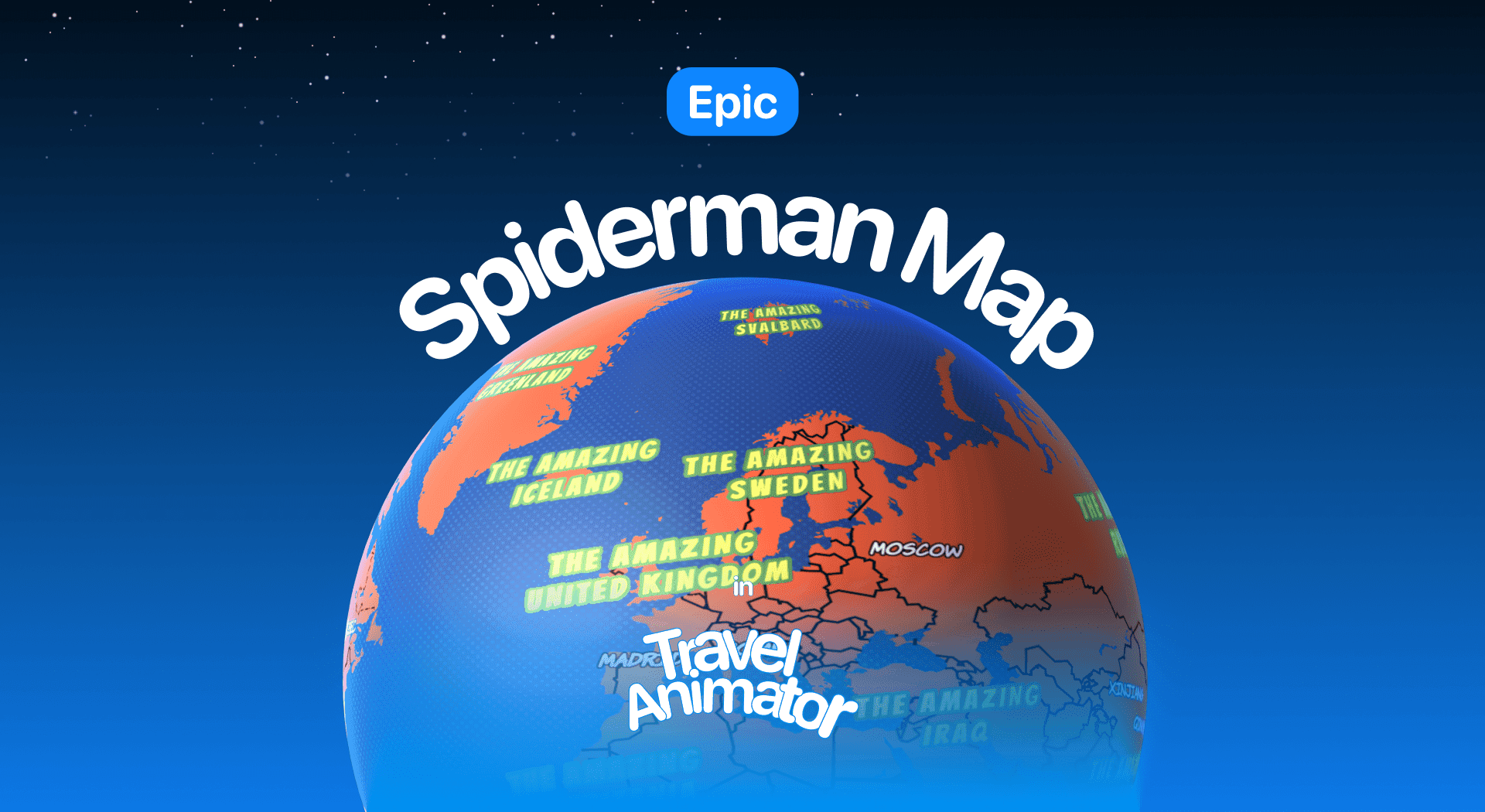
In this article 8 sections
Spiderman Map is a newly launched travel map in Travel Animator to add a thrilling, action-style twist to your travel videos and make your routes look bold and exciting.
Imagine showcasing your mountain hike, city exploration, or road trip in a fun and exciting way with bold transitions and a superhero style that grabs the attention of the viewers.
Explore the Spiderman Map in Travel Animator, its use cases, and how to improve the animation video with the Spiderman Map.
What Is the Spiderman Map Style in Travel Animator?
The Spiderman Map is a unique cartoon-style map background available in Travel Animator. It uses red and blue color schemes similar to the cartoon superhero’s costume and includes bold font and colors for place names.
This map is designed to be visually engaging, fun, and perfect for creators who want to bring their animation to life like an illustrated storybook. You will get the same accurate locations and models, but a unique map style.
Is the Spiderman Map Style Free or Premium?
You will get the Spiderman Map Style for free for the first thirty days from the release of the map.
The Spiderman Map is activated only in the premium plan of the Travel Animator. You can switch to 2D or 3D based on your needs. Use advanced models and HD quality in the premium version to make the animation more attractive.
Steps to Use the Spiderman Map Style in Your Project
- Open the Travel Animator App and sign up/in using an email.
- Upgrade to Travel Animator Pro and start creating your video. You will get 30 days of free trial from the day the map is released.
- Add the locations manually, paste your Google Map route link in the Travel Animator, or upload the GPX file of your route to Travel Animator.
- Add different models, images, and labels to each destination.
- Preview the video and take the Map style to use the Spiderman Style.
- Select the Spiderman style from the map menu.
- You can toggle between 2D and 3D as per your preference.
- After every adjustment, export the video in HD or 4K quality.
- You can share the video directly on any platform.
Want the comic energy without the character theme? The Nova map keeps the bold, glowing look.
Who can use the Spiderman Map Style?
- Travel creators on YouTube or Instagram can grab attention instantly with the Spiderman map’s bold and unique visuals that stand out in any feed.
- Adventure vloggers can match the high-energy vibe of their journeys with this dynamic style.
- Agencies or freelancers working on client travel content can use this style to a younger, modern audience.
- Anyone sharing personal travel stories can make their videos feel more vibrant, fun, and unforgettable using this creative Spiderman map style.
- For kids’ travel videos, a cartoon-like aesthetic adds fun and excitement, especially for younger viewers.
For another story-led style, see Loki’s World.
Making a Spiderman Map Video Look Sharp
A red and blue map with bold place names is loud by design. The trick is to make your route stand out without turning the frame into noise.
- Avoid red or blue route lines. They blend straight into the map. White, yellow or black usually cut through cleanly. You can adjust the route line color and thickness on the preview screen.
- Keep your labels short. The map’s own place names are already bold, so “Day 2: Queens” works better than a full sentence.
- Use a camera style with energy. In Scene Style, Lead keeps the camera in front of the vehicle looking back, which feels the most cinematic. Sticker and Sticker 2 give a playful, sticker-style look that suits kids’ videos.
- Keep it short for social. Bold styles work best in quick clips. For a Reel, set a 9:16 ratio and aim for roughly 10 to 30 seconds.
For example, a New York weekend from JFK to Times Square, the Brooklyn Bridge and Coney Island, using a car model with a white route line and Lead camera, plays like the opening of an action film.
When a Calmer Map Might Work Better
The Spiderman Map is great for fun, high-energy content, but it isn’t the right call every time. For a client itinerary or business presentation, a cleaner style like Standard keeps attention on the route and the details. On a long route with fifteen or more stops, a busy background can make the path hard to follow, so try it in preview and switch if the line gets lost.
Changing styles is quick, because the map is picked on the preview screen after your stops, models and labels are in place. Our guide on changing the map style walks through the menu, including the 2D and 3D switch.
Is the Spiderman Map Style Right for Your Next Travel Video?
If you’re looking to turn your travel routes into bold, exciting stories, the Spiderman map style might be your perfect match. Whether you’re a content creator, agency, or just someone who loves sharing adventures, this style brings a fun, cinematic twist to your animations. Give your viewers a superhero-level travel experience. Upgrade to Travel Animator Pro today.
Frequently Asked Questions
What Is the Spiderman Map Style in Travel Animator?
The Spiderman Map is a unique cartoon-style map background available in Travel Animator. It uses red and blue color schemes similar to the cartoon superhero’s costume and includes bold font and colors for place names.
Is the Spiderman Map Style Free or Premium?
The article describes a 30-day introductory offer measured from the map’s release date, not a fresh trial for each user. Check the map’s current availability and access requirement in the app before using it.
Who can use the Spiderman Map Style?
Travel creators on YouTube or Instagram can grab attention instantly with the Spiderman map’s bold and unique visuals that stand out in any feed. Adventure vloggers can match the high-energy vibe of their journeys with this dynamic style.
What route line color works best on the Spiderman map in Travel Animator?
Pick a color that isn’t already in the map. Red and blue lines blend into the Spiderman background, while white, yellow or black usually stay visible from start to finish. Change the color and thickness from the route line options on the preview screen, then play the full preview on your phone to check the line holds up at small sizes.
Which camera style suits the Spiderman map style?
Lead is a strong choice because the camera stays ahead of the vehicle and looks back, which gives an action-movie feel. Sticker and Sticker 2 suit playful or kids’ videos. Open Scene Style on the preview screen, try each option along with the 1x, 2x and 3x zoom levels, and keep the one that makes your route easiest to follow.
Why can't I select the Spiderman map in Travel Animator?
Open the map menu from the preview screen, not the route editor. If the style isn’t listed, update the app to the latest version. If it’s visible but locked, the 30-day free period from the map’s release has ended and the style now needs a Travel Animator Pro subscription. Sign in before upgrading so the purchase links to your account.